Learn
How to Choose an Expert Advisor: MT4 & MT5 Checklist
At a glance
Choose an expert advisor by checking its trading rules, loss controls, evidence and compatibility with your exact setup. Before paying, mark each check in this guide's buying checklist, from trading logic and exposure limits to costs and your own validation, as documented, missing or incompatible. A vendor claim without the relevant evidence counts as missing. Advertised returns alone cannot settle any of these checks.
On this page

An expert advisor (EA), also called a trading robot or forex robot, is software for MetaTrader that can automate trading tasks, including placing and managing orders. The name describes what the software can do; it does not establish that its strategy is profitable. If the mechanism is new to you, start with what an Expert Advisor is and how it works.
This guide is for comparing MT4 and MT5 EAs before purchase or use. It provides a reusable decision process, not a ranking of robots or a recommendation to trade. Platform and service documentation checked: 20 September 2026.
Disclosure: RoboXpert is developing its own trading software. This guide contains no affiliate links and does not test or endorse a particular EA. AI assisted with research and drafting. The author has approved this guide for publication. The worked example is hypothetical. See our editorial disclosure and evidence methodology.
If your EA does not place orders at all, use our MT5 EA diagnostic guide to separate startup, permissions, signal conditions and order responses.
If your first question is whether EAs work at all, read what EA results can prove. It separates working software, economic results and evidence of repeatability.
The EA buying checklist
Use three answers for each check: documented, missing, or incompatible. A vendor claim without the relevant evidence belongs under “missing.” These checks are a decision worksheet, not a validated scoring model: passing them does not establish profitability or suitability.
Scroll horizontally if needed
| Check | What to ask for | When to pause the purchase |
|---|---|---|
| Trading logic | Plain-language entry, exit and position-sizing rules | You cannot describe how a losing sequence develops |
| Exposure limits | Maximum positions, lot progression and loss-control behaviour | Exposure can increase without a stated limit |
| Evidence | Labelled backtests, untouched historical tests and account records | Simulations are presented as live trading |
| Drawdown | Equity as well as balance, open exposure and measurement period | Only closed-trade profits or a cropped curve are shown |
| Compatibility | Exact platform, instruments, account model and dependencies | Your broker account or hosting cannot run the EA as specified |
| Costs and terms | Trading costs, licence terms, hosting and external service costs | Essential recurring costs or licence restrictions are unclear |
| Your validation | A way to inspect behaviour and test the intended setup | You are expected to fund an account before resolving basic questions |
The practical decision is not “Which robot has the highest score?” It is “Which questions must be resolved before I can evaluate this system at all?” An incompatible account model cannot be offset by an attractive backtest.
1. Understand how the EA trades and loses
Start with the system's mechanics. A seller need not reveal proprietary source code to explain whether an EA follows trends, trades reversals, scalps short moves, or manages a basket of positions.
Ask for the instruments and trading hours, what opens a position, what closes it, and whether a person changes settings during operation. “Fully automated” still leaves questions about news filters, parameter updates and intervention after losses.
Does it use grid or martingale-style recovery?
A grid opens positions at a sequence of price levels. A martingale-style sizing rule increases trade size after losses or during a recovery sequence. They describe different mechanics and can be used together or separately. Ask what the particular EA actually does rather than relying on either label.
Inspect the entire basket: the maximum number of entries, the total permitted volume, how spacing changes, and the conditions that close losing positions. If a system waits for a recovery without a defined exposure limit, a small initial trade does not describe its eventual risk.
Our grid trading vs martingale guide lets you compare fixed and doubling lots on the same hypothetical price path, including a rebound that arrives after a margin exit.
Also distinguish a broker-side stop from an exit implemented only in EA code. Ask what remains active when the terminal disconnects. A stated stop level is not a guarantee of the final execution price, and a drawdown seen in a past report is not a future loss ceiling.
2. Separate backtests, forward tests and live results
The term “tested” is too broad to make a buying decision. Label each item of evidence before interpreting it.
For a deeper investigation, our backtest vs live trading guide explains how to compare configurations, costs and execution rather than just return figures.
Scroll horizontally if needed
| Evidence | What it can help you inspect | What it cannot establish |
|---|---|---|
| Historical backtest | Behaviour on specified historical data under a simulation model | Execution or returns on a real account |
| Historical out-of-sample test | Performance on data excluded from the stated selection process | Independence if that period was repeatedly used to revise the system |
| Demo forward test | Operation as new prices arrive, including setup and logging | The fills and costs of a funded account |
| Live-account record | What happened on that account during the reported period | Future returns, or that one EA caused every trade |
In MT5, the tester's Forward option is still a historical simulation, not evidence of a robot trading a live account (strategy optimisation documentation). Our backtest vs live guide explains what forward means in MT5.
For a report to be interpretable, request the EA version, settings file, instruments, dates, account currency, starting capital, sizing method, data source and cost assumptions. Record whether the settings were selected after seeing the reported period. An untouched test stops being untouched if its results repeatedly guide changes.
Do not apply a universal rule such as “three months proves it works.” A handful of trades and many closely related entries can both provide less independent information than their headline counts suggest. Look at the trading opportunities and conditions covered, including losing periods, rather than the calendar alone.
What does Myfxbook verification prove?
Myfxbook separates Track Record verification, which concerns agreement with the broker-supplied trading history, from Trading Privileges, which concerns the uploader's control of the account. These are useful checks on the record. They do not establish that the advertised EA produced every trade or that the strategy will remain profitable. Myfxbook explains the two checks here.
Use our Myfxbook results checklist to inspect the account, drawdown and trade history, with a worked example and a downloadable record.
Ask which EA version and settings ran on the account, whether other robots or manual trades were present, and what information is hidden. A verified account with unclear strategy attribution leaves an important buying question unanswered.
3. Look beyond win rate and balance drawdown
A high win rate can coexist with occasional large losses. A balance curve can also look calmer than the account's equity because it does not show the same picture of open-position gains and losses. Inspect both, along with open exposure and the time spent below previous equity highs.
Ask how the drawdown was calculated and how frequently equity was sampled. A screenshot, a tester statistic and a third-party dashboard can use different measurements. Compare figures only after identifying their definitions and periods.
A worked example: the missing loss on the balance curve
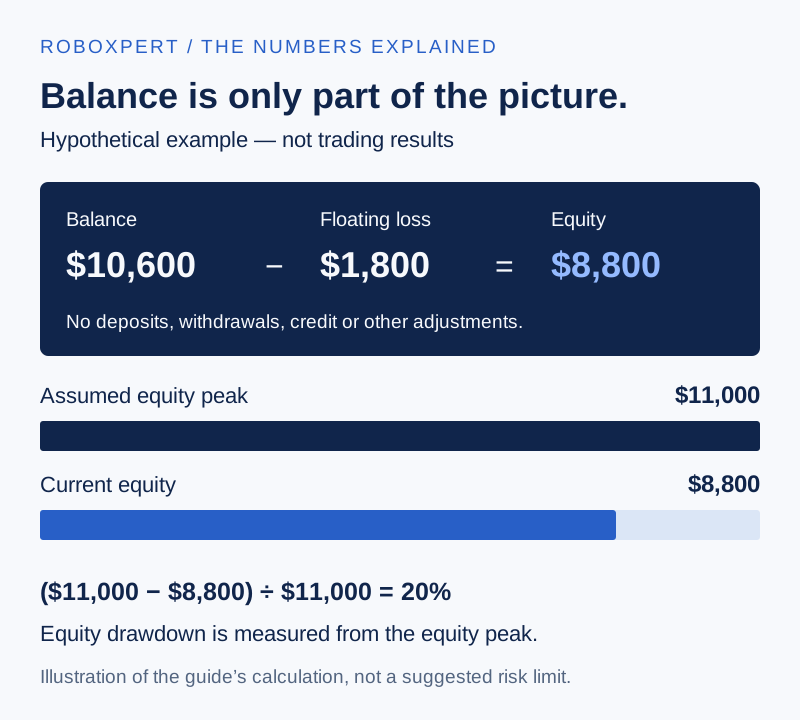
Assume an illustrative account with no deposits, withdrawals, credit or other adjustments. It starts with balance and equity of $10,000. Later, the balance is $10,600, while open positions show a net floating loss of $1,800. Equity is therefore $8,800.
Scroll horizontally if needed
| Measure | Calculation | Result |
|---|---|---|
| Change in balance | ($10,600 − $10,000) / $10,000 | +6% |
| Current equity | $10,600 − $1,800 | $8,800 |
| Equity drawdown from an assumed $11,000 equity peak | ($11,000 − $8,800) / $11,000 | 20% |
For an EA that manages several positions together, review the basket's equity exposure rather than treating each small entry as an isolated risk. If multiple EAs trade the same account, also consider whether their losses could occur together; see running multiple EAs on one MT5 account for position ownership and the shared risk budget.
4. Match the platform, broker and hosting
Buy the version intended for your platform. “Available for MT4 and MT5” should mean that the seller supplies and supports the appropriate version for each; it is not a reason to assume one installation file will work in both.
For MT5, check the account's position accounting system. Netting permits one combined position per symbol; hedging permits multiple positions, including opposite positions. The broker determines the account setup. An EA's management logic must match it. MetaTrader's account-model documentation explains the distinction. Our MT5 hedging vs netting guide steps through four hypothetical orders in both account modes and includes a read-only script to check your account mode.
Record the exact broker entity and account type, symbol names, minimum volume, volume steps, contract specifications, trading sessions and relevant strategy restrictions. Check the entity's authorisation in the appropriate regulator's register for your country. A familiar brand name alone does not identify the entity with which you would open an account. How to choose a broker for Expert Advisors turns this into 25 checks, with a read-only script that prints the values an account really has.
Check dependencies before choosing a VPS
List DLLs, external applications, web requests, licence servers and any external AI service the EA needs. MetaTrader's integrated virtual hosting forbids DLL calls; permitted web requests require the relevant URLs to be configured before migration. That makes it different from a general-purpose Windows VPS. See the official migration requirements. To decide between the two hosting types, use MetaTrader VPS vs Windows VPS: which fits your EA.
Ask what happens if a dependency becomes unavailable. Does the EA stop opening trades, keep managing existing positions, or fail in another way? The answer should be documented and tested in the intended environment. Use the setup-validation steps below to record these checks.
Is a TradingView strategy the same thing as an EA?
No. A Pine Script strategy is a separate platform-specific program. As checked in September 2026, TradingView says automated strategy trading through a brokerage account is not available directly in its platform. If a seller offers external alert-based execution, identify that separate service, its costs and failure handling. TradingView's current explanation should be checked again before purchase. Our TradingView indicator vs strategy guide lays out the chain from script event to broker response and the evidence each step needs.
5. Check costs, licensing and AI claims
Separate the price of the software from the cost of running the strategy. Your comparison should include the licence or rental, hosting, external services, spread, commission, financing and execution differences. Avoid adding spread twice when it is already reflected in entry and exit prices.
Ask whether the evidence includes those costs. MT5 supports commission settings and execution-delay simulation, but a report's existence does not show that the appropriate settings were used. Its profit-in-pips mode omits commission and swap calculations. The tester documentation describes these options. Check the actual report and configuration.
Before payment, record activation limits, what happens after a machine change, which updates are included, how support is provided and the applicable refund or cancellation terms. Do not assume every marketplace and direct seller offers the same trial or return conditions.
Can you test an MQL5 Market EA on a demo account before buying?
An MQL5 Market demo is not a demo-account forward trial. The Market rules restrict an EA demo's trading functionality to the Strategy Tester. They also explain that automated product checks do not guarantee profit or error-free operation. Clarify what testing access you will actually receive. MQL5 Market rules, section V. Our guide on reading an MQL5 Market page covers reviews, activations and refunds.
Does “AI-powered” make an EA better?
The label alone is not evidence. “Code written with AI assistance” and “an AI model makes decisions while the EA runs” describe different products. For the latter, ask which inputs and external services it uses, whether behaviour can change after model updates, and what happens during an outage.
Evaluate the resulting trading behaviour using the same evidence requirements. The CFTC's advisory on AI trading bots warns about exaggerated AI-related trading claims. Do not treat a promise of automatic or guaranteed profits as a substitute for verification.
6. Validate the intended setup before using real money
An evaluation process should have a stopping point when information is missing. A possible sequence is:
- Collect the documentation. Keep a dated copy of the product description, settings and licence terms. Write down unresolved questions.
- Try to reproduce a supplied historical test. Match the product version, inputs, data and costs. Record differences instead of silently changing settings until the curve looks similar.
- Inspect sensitivity. Where the tester supports it, compare different periods and plausible cost or execution assumptions. A result that depends on one narrowly selected configuration deserves further investigation.
- Observe operation on a demo account if the licence permits it. An MQL5 Market demo does not provide this; see section 5. Check entries, exits, logs, restarts and dependency failures. Resolve discrepancies with the documentation. Demo fills do not validate live execution.
- Write an operating plan. Specify who monitors the system, what triggers a pause, how to prevent new entries and how existing positions will be handled. Disabling automation should not be assumed to close open positions.
Completing this sequence is not an instruction to fund an account. If the EA's requirements, uncertainty or possible losses do not fit your circumstances, not using it remains a valid outcome.
A reusable worksheet for comparing EAs
Here is an example of how to record a decision without inventing a performance score:
Scroll horizontally if needed
| Field | Hypothetical candidate | Decision consequence |
|---|---|---|
| Required account | MT5 hedging | An existing netting account is incompatible with this specification |
| Evidence supplied | Historical backtest only | Live execution and live performance remain unassessed |
| Exposure rule | Maximum four positions stated; volume progression missing | Request the sizing and basket-exit rules |
| Hosting dependency | Requires a DLL | Integrated MetaTrader virtual hosting is incompatible |
| Outcome | Two compatibility gaps and missing risk information | Pause; do not infer suitability from the backtest |
This candidate is invented to demonstrate the worksheet. It is not a RoboXpert product, a tested robot or a description of a particular seller. A real comparison needs the actual files and records. Our evidence methodology explains the standards used to assess those records.
Frequently asked questions
What is the best expert advisor for a beginner?
There is no universal choice established by a marketplace rank or return figure. A beginner first needs understandable rules, compatible software, inspectable evidence and a manageable operating process. If those cannot be assessed, postponing the purchase is more useful than choosing the most heavily promoted robot.
Can an expert advisor guarantee profit?
No. Automation implements a process; it does not remove market risk, trading costs or software failures. Historical results, a verified account and an AI label do not guarantee future profits.
Is a free EA worse than a paid EA?
Price does not establish strategy quality. A free EA can still require substantial testing and operating work, while a paid EA can provide inadequate evidence. Apply the same checks and compare support, licence terms and dependencies separately. We backtested the 34 free Expert Advisors that ship with MetaTrader 5 with their default inputs on EURUSD H1; seven ended with a profit and one lost the whole deposit.
How much money do I need to run an EA?
There is no meaningful universal amount. It depends on contract size, minimum trade volume, position sizing, margin requirements and the total exposure the EA can build. A seller's minimum deposit is an operating claim to examine, not a statement that you can comfortably absorb its losses. Our guide to EA lot size and capital shows the calculation.
Should I choose MT4 or MT5 first?
Start with the actual strategy, software and broker-account requirements. Confirm that the intended version is maintained and that you can validate it in your available environment. Platform compatibility is a necessary condition; it is not evidence of a trading edge. MT4 vs MT5 for Expert Advisors compares what changes for an EA user.

Sources & further reading
- MetaTrader 5 Help: strategy optimisation and historical forward periods
- MetaTrader 5 Help: testing settings, costs and reports
- Myfxbook: what account verification means
- MetaTrader 5 Help: netting, hedging and trading operations
- MetaTrader 5 Help: virtual hosting migration and restrictions
- MQL5 Market rules: demo versions and product testing
- TradingView: automated trading with Pine Script strategies
- CFTC customer advisory: AI trading bots
Your next question