Learn
How to Verify EA Results on Myfxbook
At a glance
To verify an EA's reported results, check both Myfxbook verification statuses, identify the account and displayed period, inspect drawdown and open exposure, then establish which software produced the trades. A verified record is evidence about an account—not a guarantee of future profit or proof that one EA generated every trade. The guide applies these checks to the public SkyWebR account associated with our own software, as observed on 21 September 2026: Trading Privileges was marked verified and Track Record was not, so the record is not described as fully verified.
On this page

A screenshot of a rising curve leaves important questions unanswered. This guide shows how to inspect the public record behind an expert advisor's advertised results, record what you can establish, and ask for the missing evidence.
It is written for someone evaluating an EA, rather than an account owner setting up Myfxbook. The original documentation review and account observation date is 21 September 2026. The Gain/Absolute Gain calculation section was expanded and its two help pages rechecked on 1 October 2026; the dated SkyWebR snapshot below has not been refreshed. Interfaces and account values can change.
Disclosure: RoboXpert develops trading software. The SkyWebR account below is associated with our own product; this is an openly disclosed example, not an independent product review or an audit of its full trading history. AI assisted with research and drafting. The guide is educational and does not recommend an investment. See our editorial disclosure.
The seven-step Myfxbook checklist
Open the public account page, rather than relying on the seller's screenshot. Record the URL and your observation date. Use observed, missing, or needs reconciliation for each finding; a single total score would hide important differences.
Scroll horizontally if needed
| Step | Where to look | What to record or ask |
|---|---|---|
| 1. Check both statuses | Verification labels near the account header | Track Record and Trading Privileges separately; do not infer one from the other |
| 2. Identify the account | Account header and Info panel | Real or demo, currency or cent denomination, broker, platform and leverage |
| 3. Establish the period | Chart, Custom Analysis, history and update indicator | Displayed dates, any selected start date, first available history and last update |
| 4. Inspect cash flows | Gain, Abs. Gain, deposits and withdrawals | Which calculation supports the advertised return, and whether cash flows need explanation |
| 5. Inspect risk | Drawdown, balance/equity and Open Trades | Historical declines, current floating exposure and what is unavailable |
| 6. Examine the trades | History and available trade details | Losses, position sizes, overlapping trades and whether the advertised EA is identifiable |
| 7. Establish the configuration | Provider documentation and dated change log | EA version, settings, manual intervention and other systems sharing the account |
Download the fillable text worksheet to keep these observations together. You can perform this first pass without asking for anyone's trading credentials.
Prefer to work directly on this page? Use the interactive evidence checklist to record your findings and copy the questions that remain.
What Myfxbook verification actually proves
Myfxbook verification consists of two separate statuses. According to Myfxbook's verification documentation, Track Record concerns agreement between the displayed trading history and the broker/platform history, and Trading Privileges concerns whether the person adding the account has the master password and therefore trading control. Neither status establishes that one advertised EA generated the activity, whether the account is real or demo, or whether the strategy will remain profitable. The table shows what each status checks and what it leaves open:
Scroll horizontally if needed
| Status | What it checks | What it does not establish |
|---|---|---|
| Track Record | Agreement between the displayed trading history and the broker/platform history | That one advertised EA generated the activity |
| Trading Privileges | That the person adding the account has the master password and therefore trading control | Whether the account is real or demo, or whether the strategy will remain profitable |
Write down the actual state of each label. A missing check leaves that part unconfirmed; it does not, by itself, prove fabricated results. Ask for clarification rather than inventing an explanation.
Keep account provenance, software attribution and future expectations separate. Even when both checks are present, the second and third questions still need their own evidence. Other tracking services use other labels: our comparison of FX Blue vs Myfxbook shows what FX Blue’s “verified” and “semi-verified” mean.
Establish the account, period and cash flows
Read the account header before the return
Record real versus demo independently of the verification labels. Demo operation can help test setup and behaviour, but it does not demonstrate the execution achieved on a funded account. Our backtest versus live trading guide separates these evidence types.
Also record the broker, platform, leverage and displayed currency. A cent-denominated account must not be presented as if its raw balance were an equal number of standard currency units. The account header is context, not a promise that your broker account would experience identical conditions.
Distinguish the selected chart period from the available history
Check whether a start date has been selected and whether earlier activity is available. Myfxbook allows a saved custom start date; its help page says public viewers can see that a custom date is set and analyse prior history. A chosen analysis window should not be mistaken for the whole account's lifetime.
Record the last update too. An old timestamp means you lack a current observation. It does not tell you why updates stopped. Ask whether trading paused, the connection failed, or the account changed, and seek evidence for the answer.
There is no universal number of months or trades that makes an EA safe. A longer record can include more market conditions, but inspect how its exposure and configuration changed. Hundreds of positions opened as part of the same basket are not hundreds of independent tests of a trading idea.
Gain and Absolute Gain answer different questions
Myfxbook's Gain calculation uses a time-weighted approach that accounts for the balance associated with trades. Absolute Gain uses a different calculation and does not account for deposit timing in the same way. The figures can therefore diverge without either being a fabricated number.
Record both labels exactly as shown, plus deposits and withdrawals. Do not relabel either percentage as “what every buyer earned.” If a provider's advertised return uses another period, another account or a cash-profit figure, ask for that calculation and its denominator. Compare like with like before interpreting the difference.
Myfxbook Gain vs Absolute Gain: a worked cash-flow example
Gain links trade returns using their opening balances. Absolute Gain relates cash profit to deposited capital under its calculation rules. A later deposit can therefore change the relationship between the two. A difference alone does not prove manipulation.
Our hypothetical example uses two sequential closed trades, one account currency, no withdrawals, no credit, and no open positions at the end. Trade profit/loss is already net of the costs assumed for this example. These are invented amounts, not results from SkyWebR or a Myfxbook account we uploaded.
Scroll horizontally if needed
| Event | External cash flow | Closed-trade profit/loss | Balance afterwards |
|---|---|---|---|
| Initial deposit | +$1,000 | — | $1,000 |
| Trade 1 opens at $1,000 and closes | — | −$200 (−20%) | $800 |
| Deposit after trade 1 closes | +$1,200 | — | $2,000 |
| Trade 2 opens at $2,000 and closes | — | +$300 (+15%) | $2,300 |
Using the trade-by-trade formula in Myfxbook's Gain help:
Gain = [(1 − 200 / 1,000) × (1 + 300 / 2,000) − 1] × 100 = −8%.
The second trade earns more dollars because it starts with more capital. It does not undo the first trade's percentage loss. Adding −20% and +15% to get −5% would also be wrong: the growth factors are multiplied.
Total deposits are $2,200 and total closed-trade profit is $100. Applying the profit-over-deposits formula pictured in Myfxbook's Absolute Gain help gives:
Absolute Gain = 100 / 2,200 × 100 ≈ +4.55%.
Reconcile the money separately: $2,200 deposited + $100 trading profit = $2,300 ending balance. Both percentages can describe this same sequence. Neither tells a buyer what return they will earn with a different deposit schedule.
Scope of the calculation: the Absolute Gain help's prose mentions net invested funds, while its formula graphic labels the denominator “Total Deposits.” Our no-withdrawal example avoids that ambiguity. For a real record with withdrawals, credits, overlapping trades or incomplete history, request the underlying ledger and reconcile the displayed figures before applying a simplified formula.
In a review, record all three: the linked return, the cash-profit calculation and the dated cash flows. Keep the risk and open-exposure check alongside them.
Read drawdown alongside open exposure
For the calculation itself, see equity drawdown vs balance drawdown: an interactive example shows how a profitable closing balance can coexist with a much deeper decline during open trades.
Why the drawdown number can differ from the chart
Myfxbook documents three calculations: end-of-day, intraday at account updates, and growth drawdown. The account statistic uses the largest of them, while the drawdown chart shows end-of-day and growth drawdown, not intraday drawdown. A difference between the headline statistic and the plotted lows is therefore not automatically evidence of manipulation. See the official drawdown explanation.
This also limits interpretation: an update-based observation is not a continuous, tick-by-tick measurement of every moment of account risk. The largest recorded historical drawdown is not a cap on the next loss.
Check what is still open
Read balance, equity and open positions together. Closed-trade results alone cannot tell you the current floating outcome. If the public view hides open trades or their sizes, write open exposure unavailable rather than assuming there is none.
Look for overlapping positions in the same direction, changes in lot size, and losses that remain open while small winners close. These are reasons to investigate the strategy's rules; one snapshot does not establish that a system is a grid or martingale. Ask how total exposure is limited and how positions are closed during an adverse move. Our guide explains how grid trading and martingale differ and follows fixed and doubling lots through the same hypothetical price path.
Avoid “safe” drawdown or profit-factor thresholds detached from the strategy, sample and costs. Your task here is to understand the evidence, including what it omits.
Connect the trades to the EA
A public account is a record of account activity. Establishing which software caused that activity requires a separate chain of evidence.
Sample the loaded History table, including losing periods rather than only recent winners. Inspect available entry and exit times, symbols, sizes and costs. Wait for the table to finish loading before treating an empty state as missing history. Note what you actually examined; sampling a few rows is not an audit of thousands of trades.
Ask the provider for a dated record linking the account to:
- The exact EA version and input settings used during the displayed period.
- Dates of changes to sizing, symbols or strategy rules.
- Other robots or manual trades on the account.
- Any restarted or replacement accounts relevant to the performance claim.
Trade comments or identifiers can support that explanation when available, but a label alone is not independent proof. If the current product differs from the configuration that generated the record, request evidence for the current version too. Our EA buying checklist puts this alongside compatibility, costs and operating requirements.
Worked example: a public SkyWebR record
We inspected the public SkyWebR account on 21 September 2026 while signed out of Myfxbook. This account is associated with our own software, the SkyWebR EURUSD grid EA. The observations below are a dated reading of the public interface, not an independent performance endorsement.
Update, 14 October 2026: that page no longer opens. The same account is now listed in the RoboXpert profile: SkyWebR on Myfxbook. There, too, Trading Privileges is marked verified and Track Record is not. The observations below describe the former page on 21 September and have not been redone on the new listing; its current values differ.
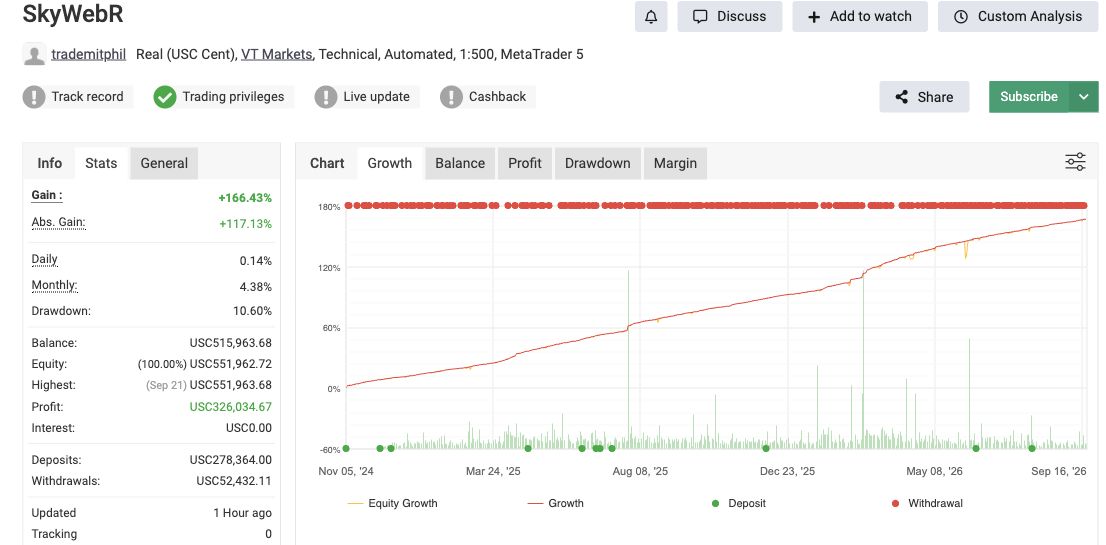
Original public-page capture, cropped to the account overview. Open the image for full size. The explanations below are ours; account values and status symbols have not been edited.
- Header · account context“Real (USC Cent)” identifies the displayed account type and units. Read it separately from the verification row.
- Status row · two different checksTrack Record has an exclamation mark; Trading Privileges has a check mark. One confirmed status does not confirm the other.
- Info panel · historical drawdownThe recorded statistic is 10.60%. The chart on the right is Growth, not the Drawdown chart, and the statistic is not a future loss limit.
Source: SkyWebR on Myfxbook, public page captured 21 September 2026. That listing no longer opens; since 14 October 2026 the same account is listed at SkyWebR on Myfxbook, where current values differ. This is our own product's account, not an independent review.
Scroll horizontally if needed
| Checkpoint | Observed on 21 September 2026 | What remains unresolved |
|---|---|---|
| Verification | Trading Privileges was marked verified; Track Record was not | The record must not be described as fully verified on this observation |
| Account context | Real, USC Cent, VT Markets, MetaTrader 5, leverage 1:500 | These labels do not establish the conditions of another user's account |
| Return labels | Gain +166.43%; Abs. Gain +117.13% | Different calculations; neither is a forecast or a return promised to a buyer |
| Drawdown | Headline statistic 10.60% | Historical statistic, not a future loss limit or a complete reconstruction of exposure |
| Public detail | Open Trades and a populated History table were visible after loading | Only visible rows were sampled; the full ledger was not reconciled |
| Product attribution | The account was named SkyWebR | The public page alone did not establish exact settings, version history or exclusive EA attribution |
Conclusion of this inspection: the public record was partly inspectable, but the unconfirmed Track Record status and unresolved software attribution prevent a blanket “verified EA performance” conclusion. The appropriate next step is to resolve those specific gaps, not to turn the positive return into a recommendation.
The useful output is this separation between observation and interpretation. Apply the same standard to an unrelated provider and to our own products. Our methodology explains the broader evidence approach.
Review an account yourself
The seven-step workflow becomes eight checkpoints here because Track Record and Trading Privileges need separate answers. Record your own observations, not the example account's answers. The tool carries unreviewed items into the report so that an incomplete review cannot silently look complete.
Your evidence review
Work through the public account in another tab. Choose Confirmed only when you have supporting evidence; add its location in a note. An unresolved question and unavailable data are different findings.
Entries stay in this tab and clear on reload. Copy or save your review before leaving. Do not enter passwords or private account details.
0 of 8 reviewed · 0 marked confirmed
This records your observations. It does not verify the account automatically or rate an EA's safety. Unchecked items remain in your report.
Turn missing evidence into specific questions
Instead of asking “Is your EA good?”, send the provider a precise request such as:
I reviewed your public Myfxbook page on [date]. Please identify the EA version and settings used during [period], explain any changes or manual trades, and clarify [specific verification status or unavailable data]. Does the current product use the same configuration?
Keep the answer beside the source URL and your original observation. A statement from the provider is useful context; label it as a statement until supporting evidence is available. If a material gap cannot be resolved, the record is insufficient for that particular claim. You do not need to infer fraud to decide that evidence is incomplete.
Download the Myfxbook checklist (TXT). A reusable worksheet for the public URL, verification statuses, account conditions, visible risks and questions for the provider. No registration required.
Frequently asked questions
Does verified mean the account is real rather than demo?
No. Read the real/demo label separately. The two verification statuses concern history and account control; neither substitutes for account-type information.
Can a verified Myfxbook record guarantee future profit?
No. It concerns a reported account record, while future market conditions, exposure and execution remain uncertain. It also does not identify the software behind every trade.
Why is Myfxbook drawdown higher than the chart suggests?
The headline statistic and the chart do not include the same drawdown calculations. Myfxbook documents three: end-of-day, intraday at account updates, and growth drawdown. The account statistic uses the largest of them, while the drawdown chart shows end-of-day and growth drawdown, not intraday drawdown. Check the drawdown section before comparing them or alleging that a chart hides losses.
How many months of results should an EA have?
There is no universal pass mark. Record the period, the market conditions represented, configuration changes and how trades overlap. Treat a short or narrowly concentrated sample as a limitation to investigate.
How do I verify my own Myfxbook account?
That is a setup task rather than a buyer's evaluation. Follow Myfxbook's current verification instructions for your connection method. Do not post trading passwords in public comments or support discussions.

Sources & further reading
Your next question