Learn
FX Blue vs Myfxbook: What Each Verification Proves
At a glance
FX Blue and Myfxbook both publish MT4 and MT5 account histories, and they verify different things. FX Blue grades the data source: “Verified” for account sync with the investor password, “Semi-verified” for its Publisher EA, “Unverified” for uploads. Myfxbook checks two things separately: that the history matches the broker’s (Track Record) and that the owner holds the master password (Trading Privileges). Neither label shows which EA placed the trades or what happens next. The services also differ in what an owner can leave out: on FX Blue’s Publisher route, trades before a chosen start date are never sent; on Myfxbook, visitors can see that a start date was set.
On this page

A seller links to a results page and calls it a “verified track record”. On FX Blue and on Myfxbook that word stands for different checks. This guide compares what each service confirms, how the account data gets there and what the account owner can leave out.
It is written for two readers: someone who evaluates an EA seller’s published record, and someone who wants to publish an own EA account and has to choose a service.
How we worked: We read the documentation of both services on 3 October 2026 and photographed three public demonstration accounts of FX Blue. We did not connect an account to either service for this guide. FX Blue quotes were checked in the live pages. Myfxbook blocks automated reading of its help pages, so its quotes were checked in archived copies; each one is dated and linked. Our earlier guide on verifying EA results on Myfxbook contains a dated reading of a live Myfxbook account.
Disclosure: RoboXpert develops trading software and has a public Myfxbook account for one of its products. This guide contains no partner links to FX Blue or Myfxbook. AI assisted with research and drafting. See our editorial methodology.
FX Blue vs Myfxbook: the short comparison
The table puts the answers to the main questions side by side. Each line is explained and sourced in the sections below.
Scroll horizontally if needed
| Question | FX Blue Live | Myfxbook |
|---|---|---|
| What is verified? | The source of the data, in three levels | History (Track Record) and account control (Trading Privileges), separately |
| Strongest label | “Verified”: FX Blue collected the data itself | Both statuses verified |
| Check of who controls the account | None found in the documentation | Trading Privileges |
| Can an account be public without verification? | Yes, with the label “Semi-verified” or “Unverified” | No, a public page needs full verification |
| Trades before a chosen start date | Publisher EA: never sent to the website | Kept; visitors see that a start date is set |
| Can the balance be hidden? | No | Yes, privacy is set per statistic |
| Split results by EA | Magic number or order-comment tags | Filter by magic number |
| Price | Free | Free; real-time updates are paid |
Neither service names the EA that placed the trades, and neither label says anything about future results.
How account data reaches each service
Both services offer two routes. Either the service logs in to the account itself with the read-only investor password, or an Expert Advisor in your terminal sends the data. The route decides how fast the page updates, what has to keep running and, on FX Blue, which label the account gets.
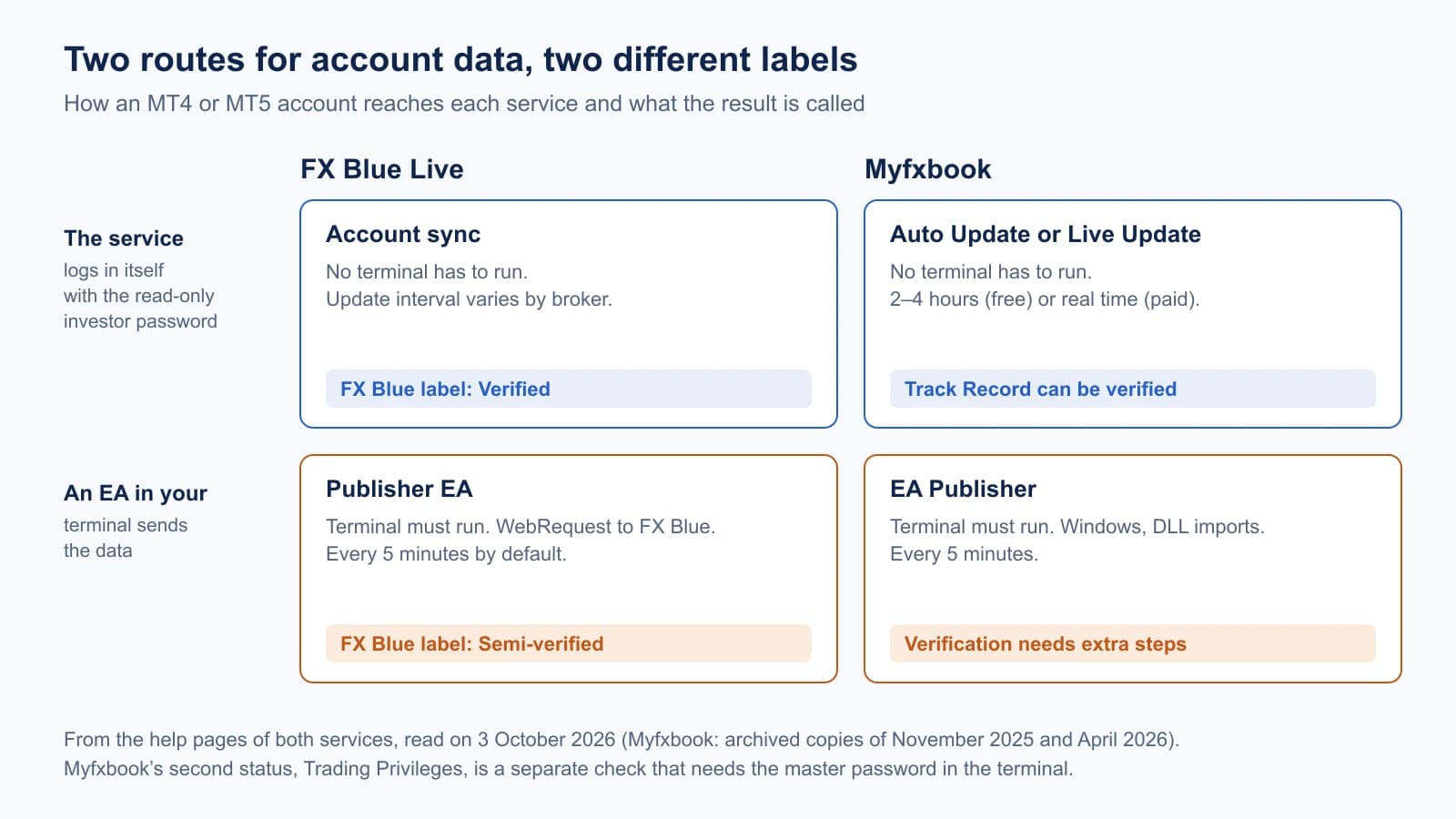
The table lists what each route needs, according to the services’ own documentation:
Scroll horizontally if needed
| Route | Needs | Update interval | Cost |
|---|---|---|---|
| FX Blue account sync | Account number, investor password, broker server in FX Blue’s list | “varies both by trading platform and by broker” | Free |
| FX Blue Publisher EA | Terminal running, EA on one chart, WebRequest allowed for https://publisher.fxblue.com, FX Blue username and password | Every 5 minutes by default, down to 60 seconds | Free |
| Myfxbook Auto Update | Read-only login credentials | 2–4 hours | Free |
| Myfxbook Live Update | Read-only login credentials | Real time | Paid |
| Myfxbook EA Publisher | Terminal running on Windows, “Allow DLL imports”, Myfxbook email and password | Every 5 minutes | Free |
FX Blue describes its sync on the account sync page: “Your trading software does not need to be running, and you do not need to install anything or change any settings.” It asks for read-only access only: “the MT4 investor password, not the master account password”. For demo accounts it advises against sync on the same page: “We recommend that you use the Publisher EA for demo accounts.”
For the Publisher EA, FX Blue states that the MT4 version “does not use a DLL file”. For MT5 its documentation is not consistent: the download page describes one build with a DLL and one without, while the MT5 user guide only describes the WebRequest setup. Which build the current installer delivers can only be seen by installing it.
Myfxbook lists its three methods in the help article on MetaTrader 4 connection methods (archived copy of 16 November 2025). Auto Update runs on Myfxbook’s server: “Update interval is 2-4 hours (depending on server load).” The EA Publisher is listed with “Required OS: Windows only” and needs “Allow DLL imports”.
FX Blue: verified, semi-verified, unverified
FX Blue grades every published account by the way its data arrived. The definitions are on its page about verification:
- Verified: “FX Blue has collected the account data directly from the broker, using our account sync, or comes from a similar source where the user cannot manipulate the data.”
- Semi-verified: accounts uploaded with the Publisher EA. FX Blue writes that results “are almost certainly genuine. However, it is theoretically possible for users to manipulate the data which is sent to FX Blue.”
- Unverified: reports uploaded from MT4 by FTP, and backtest reports. “It is impossible to verify whether the results have been manipulated, or whether they are from a demo account or a real one.”
The level is shown in the row “Account type” of a result page. It is a small icon with a tooltip, not a written badge:
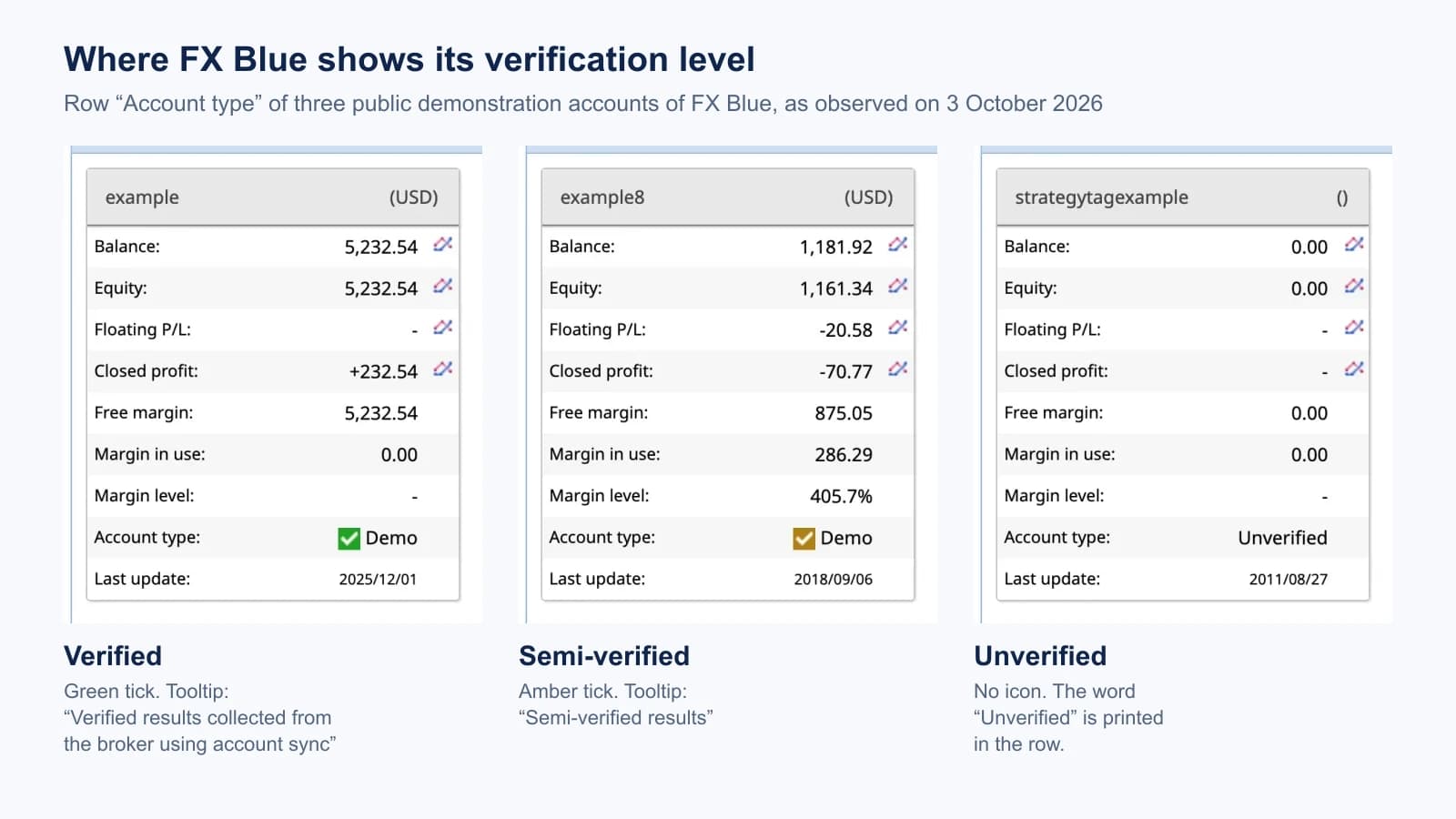
Two limits of this observation: these are FX Blue’s own demonstration accounts, some of them years old, and we did not look at a current third-party account. And the difference between the green and the amber tick is easy to miss. On a seller’s page, hover over the icon or open the link behind it.
FX Blue explains why many accounts carry the weaker label: “Our publisher EAs are faster, more private, and more flexible than account sync, and work on more trading platforms.” A semi-verified label is therefore normal for a demo account or a platform without sync. It is a statement about the route, not an accusation.
Even the strongest label has a stated limit. FX Blue’s terms say that where an account is confirmed as verified, “it is possible, for reasons beyond FX Blue’s control, for the account to still be falsified”, and that it is impossible for anyone outside the broker “to be 100% certain whether an account is demo or real.”
Myfxbook: Track Record and Trading Privileges
Myfxbook separates two checks. Its verification article (quotes checked in the archived copy of 1 April 2026) defines them:
- Track Record “indicates to users that the account’s trading history shown on Myfxbook matches the account’s trading history provided by the broker on the trading platform.” It requires the account number, the investor password and the correct broker and server.
- Trading Privileges “confirms that the individual who added the trading account possesses the master password, signifying ownership or the ability to execute trades on the account.” The owner proves this with an action in the terminal, such as changing the investor password or opening a pending order. The master password is not given to Myfxbook.
Two rules follow from the same article. Verification is also possible when the account is connected with the EA, but it needs extra steps: broker and server have to be set, and a valid investor password has to be entered. And a public page requires both checks: “users must complete the full verification process for their trading account” before making it public.
That is the largest practical difference to FX Blue. An unverified or half-verified record can be public on FX Blue with a label that says so. On Myfxbook the two labels can still differ on a page you look at: in our dated account example, Trading Privileges was marked verified and Track Record was not. Read both labels on the day you look.
What neither FX Blue nor Myfxbook proves
The table sets each label against the questions a buyer usually has. “Yes” means the service states that it checks this; it does not mean the check cannot fail.
Scroll horizontally if needed
| Question | FX Blue “Verified” | FX Blue “Semi-verified” | Myfxbook Track Record | Myfxbook Trading Privileges |
|---|---|---|---|---|
| Does the history come from the broker’s records? | Yes, collected by FX Blue | No, sent by the owner’s terminal | Yes, compared with the broker’s history | Not its subject |
| Does the publisher control the account? | Not checked | Not checked | Not its subject | Yes, master password shown by an action |
| Is the account real money? | Shown as demo or real; FX Blue says no one outside the broker can be fully certain | Same | Separate label on the page | Not its subject |
| Did one named EA place the trades? | No | No | No | No |
| Were the settings the same throughout? | No | No | No | No |
| Will the results continue? | No | No | No | No |
In the FX Blue pages we read, we found no check of who controls the account. Account sync only needs the investor password, which the owner can hand to anyone. That is an absence in the documentation, not a statement by FX Blue.
The last three rows are the same for every tracking service. A verified history is evidence about an account. Which software traded it, with which version and settings, has to be established separately. Our EA buying checklist lists what to ask a seller for.
Start dates, filters and hidden data
A record can be genuine and still incomplete. Both services let the owner limit what is shown, and they handle it differently.
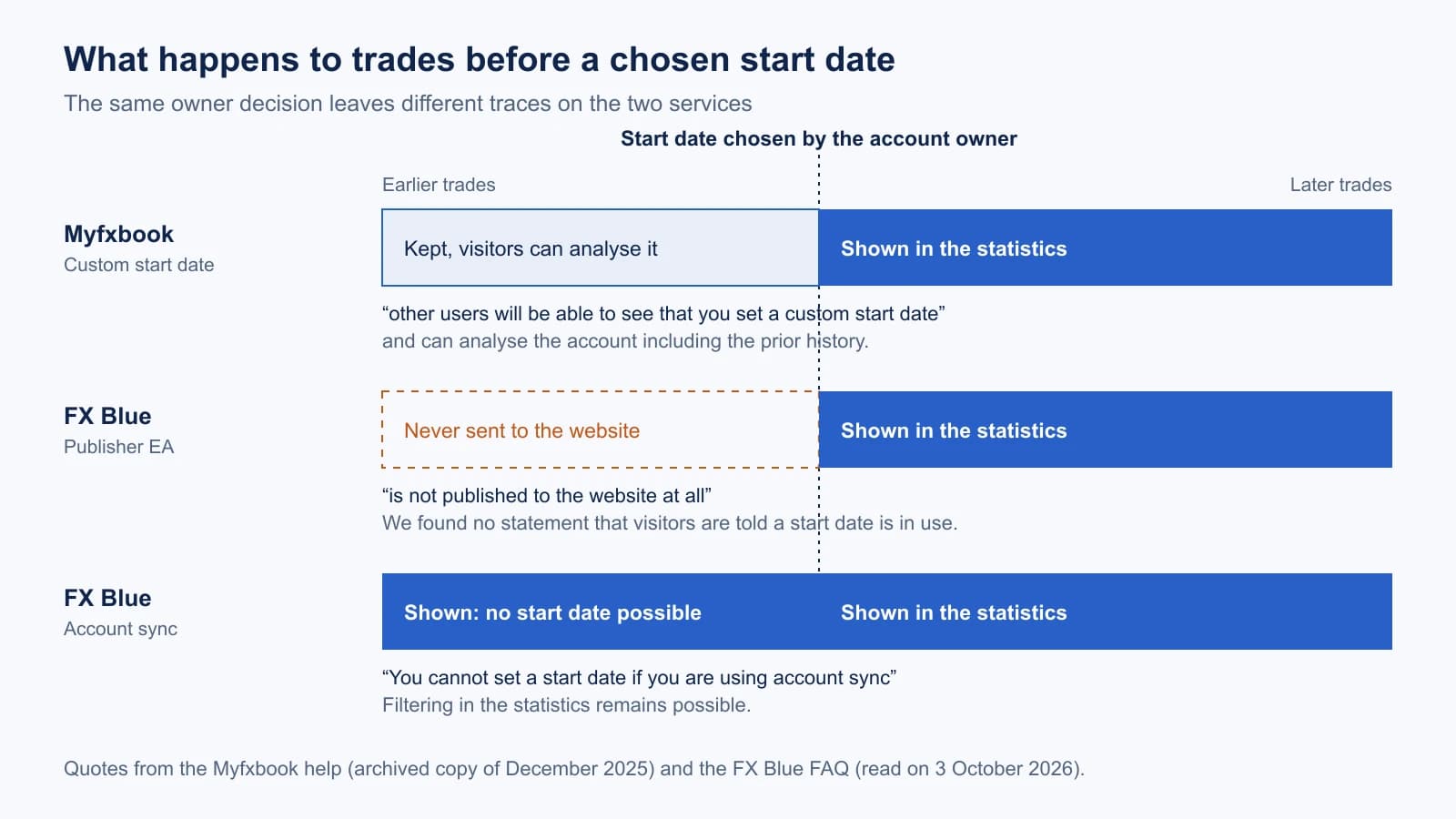
Start date. On Myfxbook the earlier history stays. The help article on setting a custom start date says: “other users will be able to see that you set a custom start date and they will have access to analyzing your account including the prior history.” On FX Blue the FAQ says of its publisher apps: “All trading activity before this date is then ignored, and is not published to the website at all.” With account sync that option does not exist: “You cannot set a start date if you are using account sync”. We found no FX Blue statement that visitors are told when a start date is in use.
Filters. FX Blue’s Publisher EA for MT4 can limit publication to chosen symbols or magic numbers. The MT4 user guide says that “the website will display a warning because this filtering can lead to discrepancies between the P/L in the trade history versus the current equity/balance.” We did not see that warning on a page.
Balance and trades. FX Blue does not allow hiding the account size. The same FAQ says: “You cannot hide both your balance and your equity.” Its reason is that it “makes a material difference whether a return of e.g. 50% has been achieved on a deposit of $100 or $100,000.” Owners can hide the list of individual trades while statistics stay visible, and they can protect the whole page with a PIN. Myfxbook sets privacy per statistic in a “Permissions” tab, described in its help on setting your account public (archived copy of 9 December 2025); its feature page names “Balance, trade size, broker” as examples.
The consequence for a reader: on FX Blue, the route that is labelled “Semi-verified” is also the route that allows a start date and filters. A semi-verified page with a short history is worth one question to the seller: since when has the account existed, and was a start date set?
Finding one EA in the account: magic numbers and comments
An account can hold several EAs and manual trades. Both services can split results by magic number, the identifier an EA writes into its orders.
FX Blue describes two ways in its FAQ: the Strategy tab “can analyse your trading results based on the ‘magic number’ of orders (MT4/MT5 only), or based on tags which you define to match against each order’s comment.” With the Publisher EA this needs the setting PublishMagicNumbers; comment tags need published order comments. FX Blue adds a caution: one order can match several tags, so the totals of the tags can differ from the total of the account.
Myfxbook lists “Filter By Magic” on its feature page (archived copy of 11 July 2026): “Analyze your performance by magic number. Know exactly how each EA performs.”
A magic number is a label the EA sets itself. It groups trades; it does not prove which program wrote them. Two EAs can use the same number, and a number says nothing about version or settings.
On other statistics we make no comparison. FX Blue documents MAE and MFE for its MT4 Publisher EA and a risk-of-ruin projection. We could not read the corresponding Myfxbook pages, so this guide does not say that Myfxbook lacks them.
How to check a published page
On an FX Blue page:
- Find the row “Account type”. Hover over the icon or follow its link: verified, semi-verified or unverified.
- Read whether the same row says demo or real.
- Read “Last update”. An old date means you have no current observation.
- Compare the first trade date with what the seller says about the age of the account. Ask whether a start date or a filter is set.
- Open the Strategy tab and look at the magic numbers. More than one number, or manual trades with number 0, means the page shows more than one EA.
- Read balance and equity together. A large gap is open loss.
On a Myfxbook page, read both verification labels, the real or demo label and the note on a custom start date, then follow the seven-step checklist of our Myfxbook guide.
On either service, write down the date of your reading. Both pages change with the account.
What we did not test
- No account was connected. Everything about setup, update speed and the appearance of an own page comes from documentation. A test with one account on both services has not been done.
- No current third-party FX Blue account was inspected. The three screenshots are FX Blue’s own demonstration accounts.
- Myfxbook’s live help pages were not read for this guide. Its quotes come from archived copies dated between November 2025 and July 2026. The verification article was read live for our Myfxbook guide on 21 September 2026.
- The FX Blue Publisher EA was not installed. The open question on DLL use in the MT5 version is stated above, not resolved.
- Financing. We found no primary statement on how either free service is financed and make no claim about it.
Frequently asked questions
Is FX Blue free?
Yes. FX Blue describes FX Blue Live as “a free web-based service for analyzing and publishing your trading history.” Myfxbook is free as well; its real-time Live Update is listed as paid.
Does FX Blue verify accounts?
It grades them. An account synced by FX Blue with the investor password is labelled “Verified”. An account published with the Publisher EA is “Semi-verified”. FX Blue does not check who controls the account.
Is a verified FX Blue or Myfxbook page proof that an EA is profitable?
No. It is evidence that an account has the shown history. It does not show which EA traded, with which settings, or what the account will do next. FX Blue’s terms state that even a verified account can be falsified; Myfxbook’s labels can be read in our Myfxbook guide.
Which service should I use to publish my own EA account?
If visitors should see a history that the service collected itself, use FX Blue account sync or a server-side Myfxbook connection, and on Myfxbook complete both verifications. If the account is a demo or runs on a VPS anyway, the EA routes update faster; on FX Blue the page then carries the semi-verified label.
Who runs FX Blue and Myfxbook?
FX Blue’s privacy notice names “FX Blue LLP”, 124 City Road, London. Myfxbook’s terms name a company registered in Israel; we read them in an archived copy of 4 September 2026.

Sources & further reading
- FX Blue: about verification
- FX Blue: frequently asked questions
- FX Blue Live: account sync
- FX Blue: Publisher EA
- FX Blue: terms and conditions
- Myfxbook Help: verification
- Myfxbook Help: MetaTrader 4 connection methods (archived 16 November 2025)
- Myfxbook Help: setting a custom start date (archived 9 December 2025)
- Myfxbook Help: setting your account public (archived 9 December 2025)
Your next question