Learn
MT5 Hedging vs Netting: See What Happens to Your Positions
At a glance
An MT5 netting account keeps one position per symbol; another fill can increase, reduce, close or reverse it. A hedging account can hold separate positions on the same symbol. Opening an opposite trade is therefore different from closing a selected hedged position. Check the actual account mode and the EA’s position-management rules before combining systems.
On this page

You buy a symbol, then an EA sells it. Did the EA open a hedge, partially close your buy or reverse the account into a sell? The word sell alone cannot answer that question. The account’s position accounting and the request’s purpose matter.
This guide uses an original, downloadable arithmetic model checked on 1 October 2026 against the documented rules. The examples are hypothetical full fills, not transactions observed on two broker accounts. We do not simulate prices, spreads, commissions, swaps, margin, partial fills or rejected requests.
Check whether your MT5 account is hedging or netting
Query ACCOUNT_MARGIN_MODE through AccountInfoInteger(). The property distinguishes retail netting, exchange and retail hedging. Exchange mode also uses net position accounting, although its margin rules differ. The EA’s chart timeframe and magic number do not select the account mode. MetaQuotes account-type reference.
Scroll horizontally if needed
| Returned value | Position accounting | What to verify next |
|---|---|---|
ACCOUNT_MARGIN_MODE_RETAIL_NETTING | One net position per symbol | Does the EA coordinate with anything else trading that symbol? |
ACCOUNT_MARGIN_MODE_EXCHANGE | Netting, with exchange margin rules | Does the EA support the specific instrument and exchange constraints? |
ACCOUNT_MARGIN_MODE_RETAIL_HEDGING | Separate positions can coexist | Does management select the intended ticket and respect account restrictions? |
The kit contains a small MQL5 script that prints the mode, connection state, hedge permission and FIFO-close flag. It reads properties without requesting trades. Compile it in MetaEditor, run it from Navigator → Scripts on the intended connected account and read its log. The connection check prevents an offline default value from being presented as a verified account result. This is a compatibility check, not an EA profitability test.
ACCOUNT_HEDGE_ALLOWED and ACCOUNT_FIFO_CLOSE describe additional restrictions. A hedging label is not permission to assume any closing order is accepted. Inspect the actual account values and broker requirements. Account properties.
Four orders, two different position books
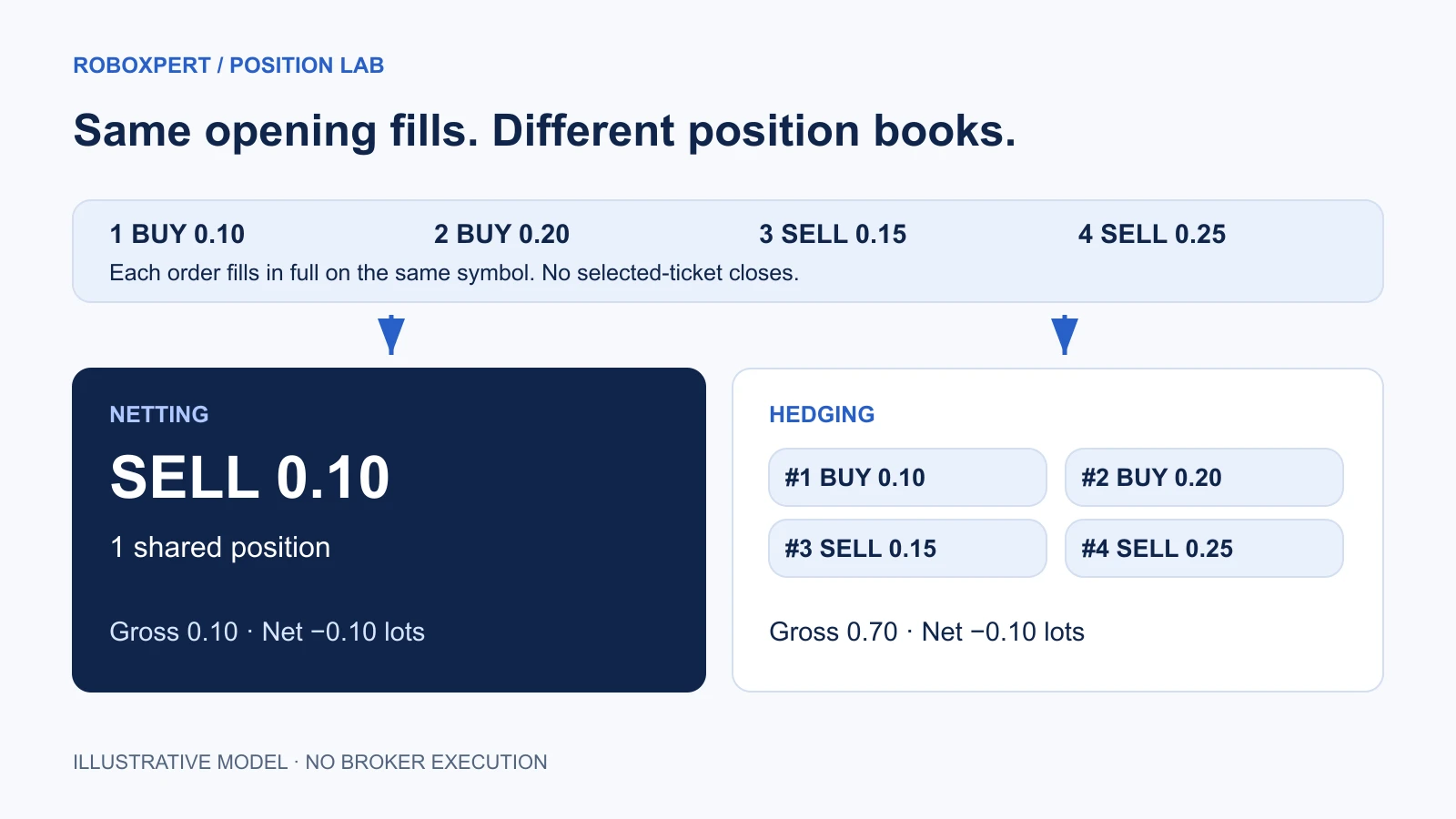
Two hypothetical systems, A and B, use different magic numbers, 101 and 202. They trade one identical symbol. Every step below is a new opening order filled in full; none names an existing hedged ticket to close. For readability, the model labels hedged positions #1–#4. These are teaching labels, not real MT5 tickets.
Position lab · illustrative fills
Follow four filled opening orders on one symbol. Each step assumes a full fill; no prices, fees or margin are simulated.
Start: both accounts are flat
Netting
Flat
0 open positions
Open volume: 0.00 lots
Hedging
0 positions
No open positions
Gross: 0.00 lots · Net: Flat
A and B are hypothetical systems with different magic numbers. Their labels do not change the accounting rules.
Opening a sell and closing a selected buy ticket are different requests. This model sends no trades.
The complete ledger remains readable without using the controls. Each row lists what is open after that order: the single netting position and every hedging position with its own size.
Scroll horizontally if needed
| Filled opening order | Netting position afterward | Hedging positions afterward |
|---|---|---|
| A buys 0.10 lots | Buy 0.10 | #1 buy 0.10 |
| B buys 0.20 lots | Buy 0.30 | #1 buy 0.10; #2 buy 0.20 |
| B sells 0.15 lots | Buy 0.15 | #1 buy 0.10; #2 buy 0.20; #3 sell 0.15 |
| A sells 0.25 lots | Sell 0.10 | #1 buy 0.10; #2 buy 0.20; #3 sell 0.15; #4 sell 0.25 |
At the end, the netting account has one 0.10-lot sell. The hedging book contains 0.30 lots bought and 0.40 lots sold: 0.70 lots of gross open volume and a signed net exposure of −0.10 lots. The same signed volume does not establish equal costs, margin or realized profit.
The arithmetic is 0.10 + 0.20 − 0.15 − 0.25 = −0.10. Magic numbers label the two systems; they do not change that sum. The underlying increase/reduction/reversal distinction is documented in MetaTrader’s accounting rules.
Our checks cover the four-step sequence, an equal opposite fill returning net exposure to zero, ticket-specific full and partial closes, invalid close requests and equal signed exposure across the opening sequence. Passing those checks validates this teaching model; it does not certify a broker or an EA.
Opening a sell is not the same as closing a buy
Consider the book after step two. On hedging, A owns a 0.10-lot buy and B owns a 0.20-lot buy. Compare these two hypothetical requests:
Scroll horizontally if needed
| Request | Result in our hedging model | Total signed exposure afterward |
|---|---|---|
| Open a new 0.20-lot sell | Keep both buys; add a sell | Buy 0.10 net, across three positions |
| Close B’s selected 0.20-lot buy in full | Remove B’s buy; keep A’s buy | Buy 0.10, in one position |
The net exposure matches, but the open positions do not. An EA that substitutes the first request for the second has changed the task.
In MQL5, selecting by symbol with PositionSelect(symbol) picks the lowest-ticket position on hedging accounts. It does not automatically find the position belonging to the caller’s magic number. Selection also copies properties, so refresh the selection before relying on the values. PositionSelect reference.
CTrade::PositionClose supports a ticket overload. Its symbol overload also targets the lowest ticket on hedging. A true return alone is not confirmation of a completed server-side close: inspect the trade result and resulting position state. PositionClose reference.
What happens to stop loss and take profit?
On netting, one shared position has one current SL/TP pair. MetaTrader documents replacement by the latest order’s levels when volume increases or reverses; zero levels can remove existing protection. A partial close leaves the levels unchanged. The order window can prefill existing levels, so inspect what was actually submitted rather than inferring it from a screenshot. Stop-level inheritance.
For a concrete demo check, record the position’s SL/TP before and after another system adds volume. Ask the EA developer whether it preserves the shared protection, replaces it or refuses the conflict. Record both the intended behavior and the observed outcome. A setting named “my stop loss” is insufficient if multiple systems affect the same position.
Hedged positions expose their own SL/TP properties, but separate tickets do not prevent a badly scoped manager from modifying someone else’s ticket. Position properties.
Which mode fits your EA?
Neither hedging nor netting is universally better; the EA’s position management decides which MT5 account mode fits. A netting account keeps one position per symbol, so an EA that manages several independent entries on the same symbol needs separate hedged tickets or its own documented allocation layer. An EA built around one target position per symbol matches netting’s one-position accounting only if it can reconcile additions, reductions, reversals and manual changes. The table lists the question to ask for each requirement.
Scroll horizontally if needed
| EA requirement | Compatibility question |
|---|---|
| Several independently managed entries on the same symbol | Does it require separate hedged tickets, or implement a documented allocation layer? |
| One target position per symbol | Can it reconcile additions, reductions, reversals and manual changes? |
| Multiple unrelated EAs on the same symbol | Who owns the aggregate position and its protective levels? |
| A copier or external signal connector | Does “sell” mean open, reduce, close or reverse in that connector’s configuration? |
| Ticket-specific exits | Does it select the intended current ticket and handle rejection or changed state? |
These are our review questions, not a broker endorsement. If a seller only says “MT5 compatible,” request the supported account modes and a reproducible example of an opposite signal. Record the answer in the Compatibility row of our EA buying checklist. For combining systems, continue with multiple EAs on one MT5 account.
A small demo acceptance test
Use a suitable demo environment and minimum permitted volumes adapted to the symbol. Our illustrative lots are not recommended trade sizes. Record the account mode, platform build, EA version, inputs and exact symbol before testing.
- Capture the starting positions and pending orders.
- Trigger one controlled entry and identify the filled deal and resulting position.
- Trigger the intended opposite action. Write down the expected position count and direction before it runs.
- Compare the actual volume, ticket, identifier and SL/TP afterward.
- Repeat a selected-ticket close where that is the intended hedging behavior.
- Restart the EA and check that it recognizes the existing book without duplicating an entry.
These steps cover one EA’s behavior in the account mode. To test several systems together, use the acceptance table for multiple EAs.
An order is the instruction, a deal its execution, and a position the resulting holding. Keep their records separate. One order need not equal one deal. MetaTrader terminology.
Reader resource · ZIP
Inspect the position model and check your account mode
The exact TypeScript arithmetic used above, a Node.js reproduction script, a read-only MQL5 mode probe and a demo acceptance record. No order-sending code.
Download the account-mode kitCommon questions
Can I switch netting to hedging in the EA settings?
The broker sets the account’s accounting system. An EA input can change its own strategy behavior; it cannot turn a netting account into a hedging account. Ask the broker about the appropriate account arrangement and check the new account’s reported mode before moving a setup. Account accounting.
Do different magic numbers keep netting positions separate?
No. They can help identify activity, but they do not create additional same-symbol broker positions. Combining independent systems needs an explicit plan for the shared position, or separate trading accounts. See the ownership and collision checks.
Is hedging automatically safer or cheaper?
The mode alone does not establish either. Our final example has the same signed exposure but very different gross open volume. Costs, account restrictions, margin rules and the strategy’s next actions still matter. Treat “hedging” as an accounting capability, not a guarantee against loss.

Sources & further reading
Your next question