Learn
MT5 Server Time: Why Your EA Trades an Hour Early or Late
At a glance
MT5 server time is the clock of your broker's trading server, not of your computer or VPS. Charts, daily candles and every time rule in an Expert Advisor use it. Many brokers run at UTC+2, UTC+3 during US daylight saving, so server midnight is 17:00 in New York. Others follow the EU rule or stay at UTC+0. We measured all three in October 2026. On a UTC+0 server, the previous day's high or low of gold differed on 49% of trading days from 2022 to 2026. In the Strategy Tester the computer clock is replaced by server time, so a backtest of our own EA at a UTC+0 broker, July 2024 to October 2026, showed +111.7% where the live clock gave +50.1%.
On this page

An Expert Advisor that should trade at 15:30 trades at 15:30 on the broker's clock. Where you live, where your VPS stands and what your computer shows do not change that. Two brokers can disagree by hours, and some change their clocks on different dates from others.
This guide explains which clock MT5 uses, how to find your broker's, and three ways the difference reaches an EA: time rules, daily candles and backtests. The numbers come from our own measurements at three brokers and from price data we already had.
Disclosure: RoboXpert develops trading software, including the EA used as an example below, and has a commercial interest in this subject. The server times were read on 23, 25, 26 and 27 October 2026. The candle comparison uses real BlackBull gold ticks from 25 August 2022 to 27 October 2026. The backtests are backtests, not live results. AI assisted with research, calculation and drafting. See our editorial methodology.
What time zone does MT5 use?
MT5 uses the server time of your broker. MetaTrader's help says the quote time in Market Watch is "specified according to the time zone of the broker's trading server". Chart bars, daily candles, the trade history and the Strategy Tester all run on that clock.
An EA reads time through four MQL5 functions. According to the MQL5 reference, they agree only in the Strategy Tester:
Scroll horizontally if needed
| Function | Live in MT5 | In the Strategy Tester |
|---|---|---|
TimeCurrent() | Time of the last quote from the server | Simulated from the history |
TimeTradeServer() | Current server time, calculated in the terminal | Equal to TimeCurrent() |
TimeGMT() | UTC, calculated from the computer clock | Equal to the simulated server time |
TimeLocal() | The computer's own time | Equal to the simulated server time |
The last two rows matter later. An EA that converts with TimeGMT() works live and silently loses its conversion in a backtest, because the tester hands it server time as "UTC".
How to check your broker server time
You need two clocks: the server time and UTC.
- Open Market Watch (Ctrl+M). The time in its title bar is the server time of the last quote. On a weekday it ticks with the market.
- Look up UTC on any reliable clock, for example your phone's world clock set to UTC.
- Subtract. Server 16:44 at 13:44 UTC means UTC+3.
That gives today's offset. It does not tell you when the broker changes its clocks. For that, look at history: the forex week opens on Sunday at 17:00 New York time. On a broker whose first EURUSD bar of the week stands at 00:00 all year, server midnight is 17:00 New York. If the first bar moves to 23:00 or 01:00 for a few weeks in March and in late October, the broker follows the EU rule.
To check it yourself, open a EURUSD H1 chart and scroll to the second week of March and the last week of October. Note the time of the first bar after each weekend. If it is 00:00 in every week, the broker follows New York. If it is 23:00 between the US and the EU switch, the broker follows the EU rule.
Three broker server times we measured
The table shows what we read at three brokers in October 2026 and which daylight-saving rule each follows:
Scroll horizontally if needed
| Broker and server | What we read | Offset | Rule |
|---|---|---|---|
| RoboForex, Pro server | 23 Oct 2026: UTC 16:27 = server 19:27. 26 Oct: server 01:05 at 23:05 UTC on 25 Oct | UTC+3, then UTC+2 | EU: switched on 25 October |
| BlackBull, demo server | 25 Oct 2026, after the EU switch: UTC 13:44 = server 16:44 | UTC+3 | US: switches on 1 November |
| A third broker, real account used only in the tester | 27 Oct 2026: Market Watch against a UTC clock | UTC+0 | none seen |
RoboForex and BlackBull agree for most of the year. Between 25 October and 1 November 2026 they were one hour apart. The third broker was two to three hours behind both, all year.
We read RoboForex and the third broker with a small read-only script that starts MT5 with algorithmic trading switched off, waits for a fresh tick and writes the server time next to the computer's UTC.
Daily candles depend on the MT5 server time
A daily candle runs from server midnight to server midnight. Move midnight and you get other candles from the same prices.
We took the hourly gold prices of BlackBull's XAUUSD from August 2022 to October 2026 and regrouped the same hours into the days of three clocks:
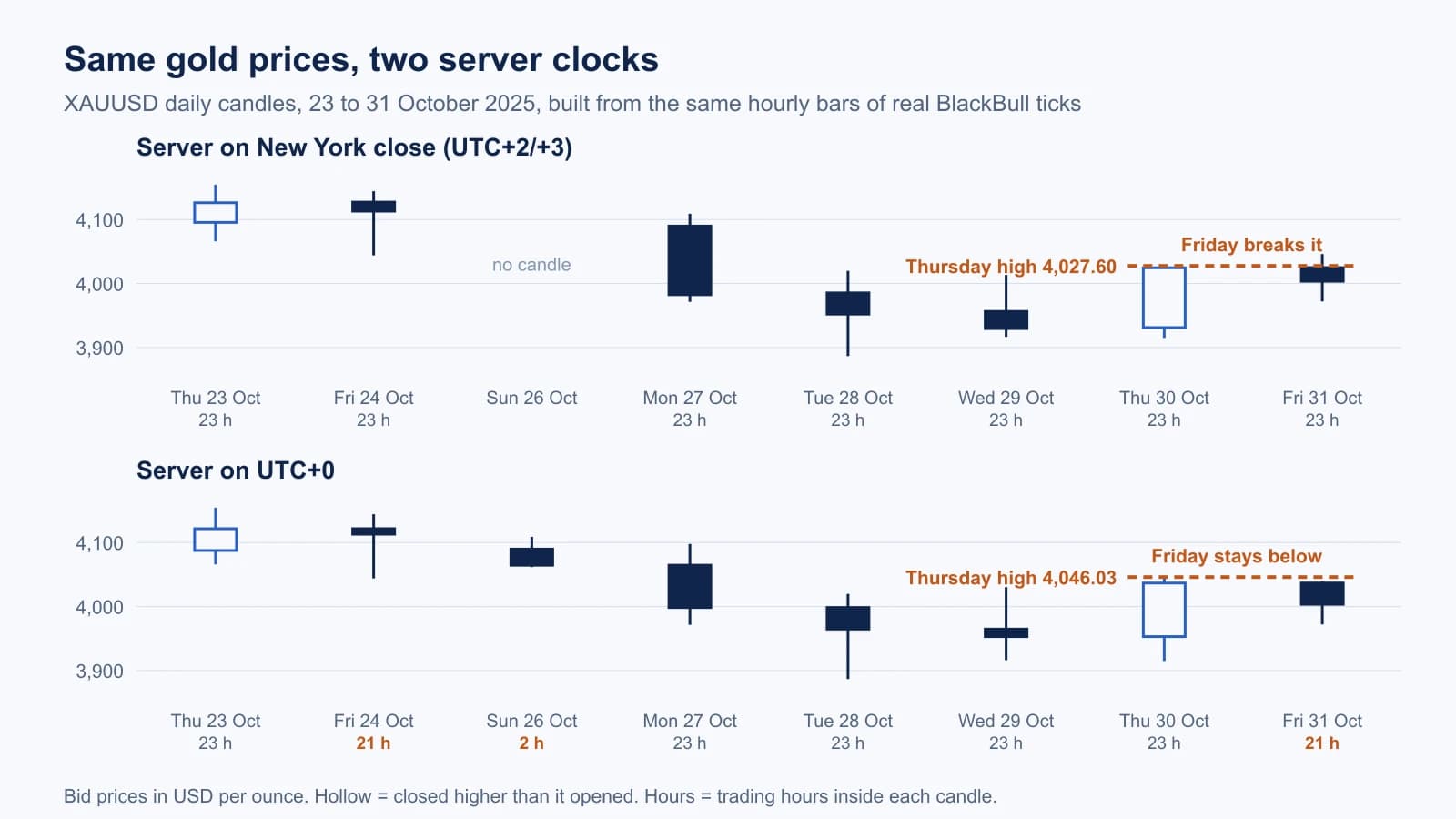
Look at Friday, 31 October 2025. On a server at UTC+2/+3, Thursday's high was 4,027.60 and Friday broke it. On a UTC+0 server the Thursday candle runs three hours longer into what is already Friday morning elsewhere, reaches 4,046.03, and Friday stays below. An EA that buys the break of yesterday's high trades on one server and not on the other.
Over the whole period, the UTC+0 clock changed yesterday's levels on about half of all weekdays, the EU rule on none:
Scroll horizontally if needed
| Server clock | Daily candles | Weekdays where yesterday's high or low differs | Where a break of yesterday's high or low differs | Mondays |
|---|---|---|---|---|
| UTC+2/+3, US rule | 1,078, Monday to Friday | reference | reference | yesterday = Friday, median range 39.41 USD |
| UTC+2/+3, EU rule | 1,078, Monday to Friday | 0 of 1,077 | 0 of 1,077 | same as above |
| UTC+0 | 1,297, including 213 Sunday candles | 529 of 1,077 (49%), median gap 8 USD | 209 of 1,077 (19%) | yesterday = a 2-hour Sunday candle, median range 9.78 USD |
On a UTC+0 server, Monday's "yesterday" is the two-hour Sunday stub on 213 of 214 Mondays. Its median range was a quarter of a normal day's. Any rule built on the previous day, such as breakout levels, pivot points or daily range filters, gets different inputs.
The EU rule made no difference to gold's daily candles. The hour that moves falls into gold's daily trading break, which sits at server midnight on these servers. That is specific to gold's trading hours; symbols that trade through midnight, such as Bitcoin CFDs, do get different candles.
The daylight-saving weeks: US rule or EU rule
The US moves its clocks on the second Sunday of March and the first Sunday of November (NIST). The EU moves them on the last Sunday of March and the last Sunday of October (Directive 2000/84/EC). A broker that follows New York and a broker that follows Europe are one hour apart in the weeks between:
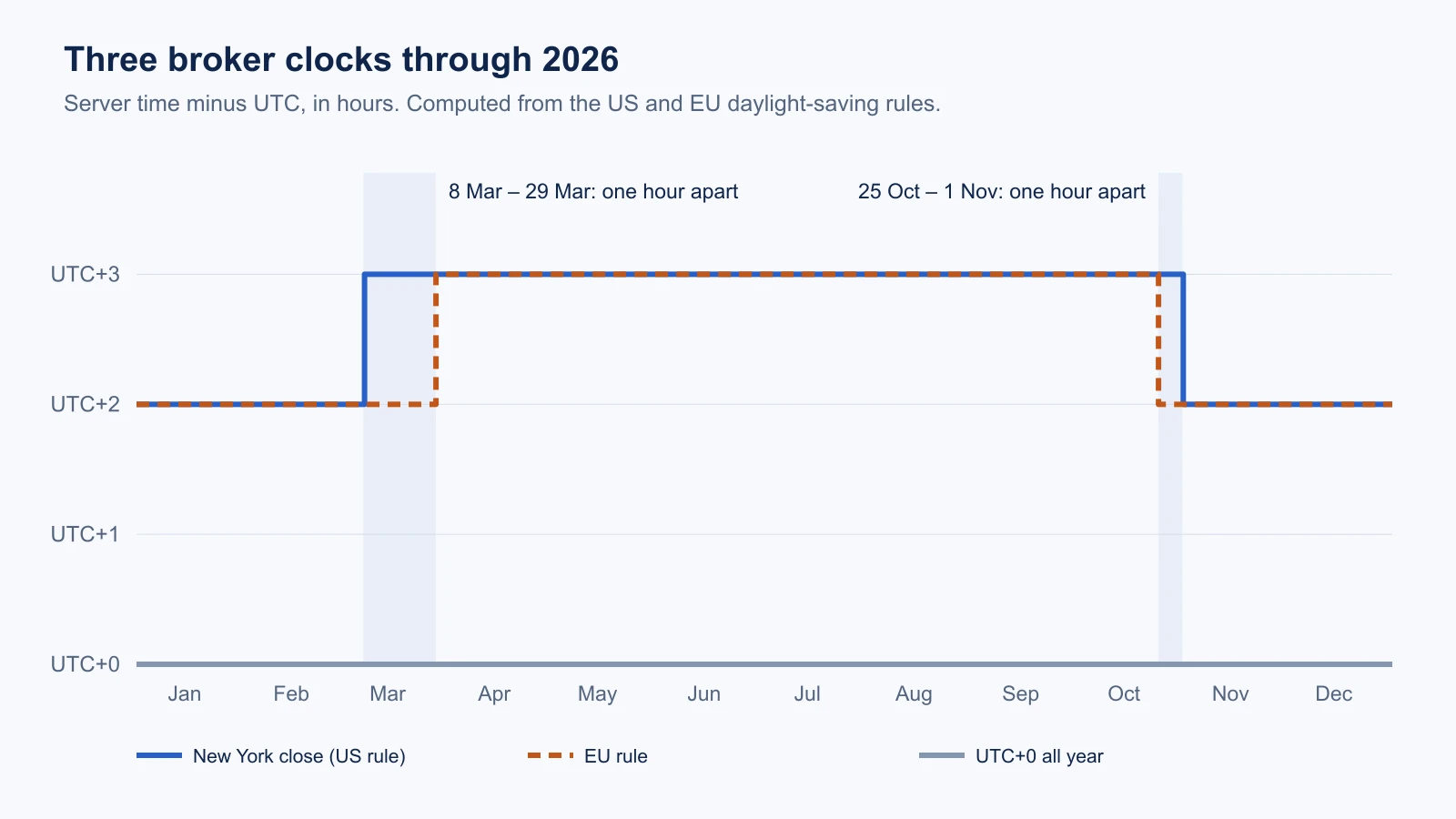
The switch dates for 2026 and 2027, and the weeks in which the two clocks differ:
Scroll horizontally if needed
| Year | US rule | EU rule | Weeks one hour apart |
|---|---|---|---|
| 2026 | 8 March to 1 November | 29 March to 25 October | 8 to 29 March, 25 October to 1 November |
| 2027 | 14 March to 7 November | 28 March to 31 October | 14 to 28 March, 31 October to 7 November |
Daily candles of gold survive these weeks, as shown above. Times of day do not. The US jobs report comes out at 8:30 New York time, according to the release schedule. That is 15:30 on a New York close server all year. On an EU-rule server it is 15:30 for most of the year and 14:30 in the March and October gap weeks. An EA that waits for 15:30 server time to trade the release acts an hour after it there.
MT5 server time in the Strategy Tester
In the Strategy Tester, TimeGMT() and TimeLocal() return the simulated server time. There is no computer clock to convert with. An EA that works out UTC from the computer clock live will, in the tester, treat server time as UTC.
We ran into this with our own Bitcoin weekend EA. Live, it reads its trading window in a fixed reference clock, UTC+2 and UTC+3 in US summer time, and takes the broker's offset from our licence server. In the tester there is no licence answer, so version 3.13 read the window in server time. At a broker on UTC+0 that moved the whole window two to three hours later.
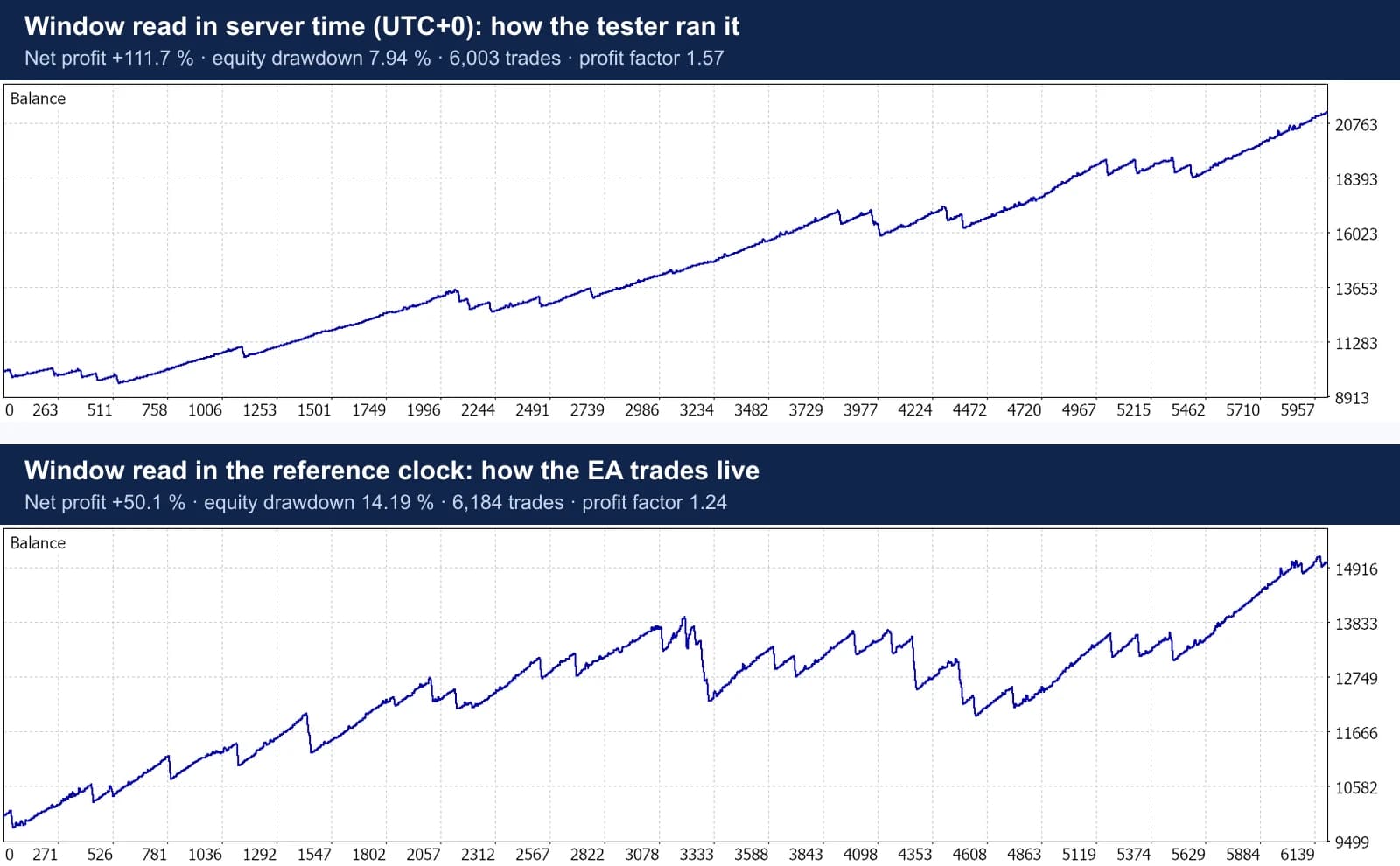
The results at all three risk levels, same broker ticks, same trading rules, 10,000 USD:
Scroll horizontally if needed
| Risk level | Window in server time (3.13 in the tester) | Window in the reference clock (3.14 in the tester) | Same ticks moved into the reference clock (live-like) |
|---|---|---|---|
| Low | +111.7%, drawdown 7.9% | +50.1%, drawdown 14.2% | +58.9%, drawdown 13.6% |
| Medium | +384.9%, drawdown 17.4% | +255.3%, drawdown 26.0% | +253.7%, drawdown 26.0% |
| High | +397.7%, drawdown 29.4% | +334.2%, drawdown 28.1% | +385.2%, drawdown 26.9% |
Net profit and relative equity drawdown as printed in the MT5 reports. The left column looked better than the EA would trade. Version 3.14 reads the broker's offset in the tester from the weekly EURUSD open, the same check as above, and its results line up with the live-like replay. The rest of the gap comes from the order of ticks and their density.
The lesson is not about this EA. If an EA has time rules, compare the hours of its backtest trades with the hours of its live trades before you compare results.
Making an EA independent of the MT5 time zone
If you write your own EA, three approaches work:
- Times as inputs in server time. Simple and honest, but the user must convert, and an EU-rule broker needs different inputs for a few weeks a year.
- A fixed reference clock. Define the times once, for example in UTC+2/+3 on the US rule, and convert the server time into it. Live, the offset is
TimeTradeServer() - TimeGMT(), which depends on a correct computer clock. In the tester, derive it from history, for example from the weekly open of a forex symbol. - Daily levels from your own day boundary. If a rule needs yesterday's high or low, build "yesterday" from hourly bars in the reference clock instead of reading the broker's daily candle.
Our shared clock module is about 100 lines and checks itself against 33 cases: switch weeks in March and November, brokers at UTC+0, +1, +4, −5 and +8, and EU-rule brokers in the gap weeks. A test like that is worth writing, because the gap weeks are exactly the cases nobody sees on a demo account in June.
Checklist before you run an EA at a new broker
- Read the broker's offset today: Market Watch time against UTC.
- Find the broker's daylight-saving rule from the first EURUSD bar of the week in March and October.
- Look up which clock the EA expects. Its guide should say "server time" and on which offset it was built.
- If the EA uses yesterday's high or low, compare a few daily candles with the broker it was tested on. A Sunday candle is the warning sign.
- If the EA trades around a release or a session open, check those times in the gap weeks of March and October.
- In a backtest, check the hours of the first trades in the report against the hours you expect live.
- Watch the first live week: compare trade times with the backtest's.
What we did not test
- We measured three brokers on four days in October 2026. Brokers can change server time; check yours.
- The candle comparison covers gold only. Currency pairs that trade through server midnight would show differences under the EU rule as well.
- The Bitcoin backtests used one broker on UTC+0 and one EA. They show the effect of the clock, not what other EAs gain or lose.
- We did not test rollover and swap timing at each broker.
Frequently asked questions
Does my VPS or computer location change the MT5 server time?
No. Charts and TimeCurrent() use the broker's server time wherever the terminal runs. Only TimeLocal() and TimeGMT() read the computer clock, and only live.
Can I change the MT5 time zone?
Not for the server. The broker sets it, and charts follow it. You can convert times in your EA or indicator, or choose a broker whose clock fits the EA.
What does GMT+2/+3 mean in MT5?
The server runs two hours ahead of UTC in winter and three hours in summer. Most brokers that say so switch with the US, so server midnight stays at 17:00 in New York. Some switch with the EU; ask or check the history.
Why do so many brokers use New York close?
With midnight at 17:00 New York, the trading week has five daily candles and no Sunday candle, because forex opens at 17:00 New York on Sunday. That is the clock most EAs and indicators are built and tested on.
Does MT5 work on weekends?
The terminal runs, but forex and gold do not trade from Friday evening to Sunday evening. Some brokers offer crypto CFDs on weekends; their server time still decides when a "Saturday" starts. How Bitcoin moves on those days is in our weekend data guide.

Sources & further reading
- MQL5 Reference: TimeCurrent
- MQL5 Reference: TimeTradeServer
- MQL5 Reference: TimeGMT
- MQL5 Reference: TimeLocal
- MetaTrader 5 help: Market Watch
- NIST: Daylight Saving Time rules in the United States
- Directive 2000/84/EC on summer-time arrangements (EUR-Lex)
- U.S. Bureau of Labor Statistics: Employment Situation release schedule
Your next question