Learn
MT4 vs MT5 Backtest: Which Strategy Tester Is More Accurate?
At a glance
The main difference in an MT4 vs MT5 backtest is the price data. MT4 generates ticks inside each bar from stored Bid prices and uses one fixed spread for the whole test, without slippage or delay. MT5 can replay the broker's recorded ticks with a spread that changes from tick to tick, but only for the period the broker has stored them, and it has generated-tick modes that work like MT4's. MT4's modelling quality figure cannot exceed 90% with minute data; a 99% figure comes from a tick-data tool such as Tick Data Suite and is not a measurement of realism. In our own MT5 backtest on EURUSD from April to September 2026, real ticks changed the price result of one intraday EA by 596 points over 129 trades, in its favour, and barely moved a slow H1 EA. Neither platform protects you from an overfitted EA.
On this page

MT5 can backtest an Expert Advisor on the ticks your broker actually recorded, with a spread that changes from tick to tick. MT4 cannot: it builds ticks inside each bar from stored prices and uses one fixed spread for the whole test. That makes an MT5 test with real ticks closer to real conditions. It does not make an EA that looked good in MT4 bad, or one that looks good in MT5 good.
A common claim among EA developers goes further: every EA looks great in an MT4 backtest and falls apart live, MT5 backtests are far more accurate, and MT4 needs a tool like Tick Data Suite to fix its modelling quality. This guide checks each part against MetaQuotes’ documentation and against eight MT5 test runs of our own.
The documentation and product pages were checked on 18 October 2026. Our MT5 runs date from 7 October 2026 (MT5 build 6230, demo server of IC Trading, EURUSD). We did not run the MT4 tester or Tick Data Suite for this guide; everything said about them comes from MetaQuotes and the vendors. AI assisted with research and drafting. RoboXpert develops its own trading software, so we have a commercial interest in this subject; see our editorial standards and commercial disclosure.
MT4 vs MT5 backtest: the differences at a glance
The table compares the two testers on the points that decide how close a backtest comes to real trading. MT5 is ahead on price data, spread and execution, but only one of its modes uses real ticks.
Scroll horizontally if needed
| MT4 Strategy Tester | MT5 Strategy Tester | |
|---|---|---|
| Price data for the test | Bars stored in the terminal, Bid prices only | Bars and, where the broker stores them, real ticks with Bid and Ask |
| Ticks inside a bar | Always generated: “fractal interpolation” from the smallest timeframe available | Generated from minute bars, or the broker’s real ticks in “Every tick based on real ticks” |
| Spread | One value for the whole test: the current spread at the start, or a number you type in | Real ticks: changes with every tick. Generated ticks: the spread stored in each minute bar |
| Execution | Instant, “without slippage”, no delay | Optional delay, including a random delay of 0 to 18 seconds |
| Symbols in one test | Only the tested symbol | Multi-currency |
| Speed | Single thread | Multi-threaded |
| Quality figure in the report | “Modelling quality”, at most 90% from minute data | “History Quality”, the share of correct minute bars; with real ticks it adds “real ticks” |
The MT4 column follows the MT4 tester help and MetaQuotes’ article Testing Features and Limits in MetaTrader 4. The MT5 column follows the MT5 testing help and MetaQuotes’ platform comparison, whose Strategy Tester row reads “Multi-threaded + Multi-currency + Real ticks” for MT5 and “Single thread” for MT4. The MT4 article is from 2005, but none of the ten most recent MT4 release notes, up to build 1490 of 2 October 2026, mentions the Strategy Tester.
The rows explain part of the claim. An MT4 test of a scalper with a 1-point spread, no slippage and no delay can show profits that the same EA never gets at a real broker. But the table also shows what the claim leaves out: MT5 has generated-tick modes that work like MT4’s, and its real ticks only exist where the broker kept them.
How the MT4 Strategy Tester makes its ticks
An EA reacts to ticks, but the MT4 terminal stores no ticks for testing, only bars. The help states that “the price history stored in the client terminal includes only Bid prices.” The tester therefore has to invent the price path inside every bar. It offers three modes:
- Every tick: “based on all available least timeframes with fractal interpolation of every tick”. For an H1 test it uses M30, M15 and so on down to M1, if those bars exist.
- Control points: “based on the nearest less timeframe with fractal interpolation of 12 control points”. MetaQuotes calls it “a very crude method” whose results are “estimated results only”.
- Open prices only: the EA is called once per bar, at its opening.
Where no smaller timeframe exists, MetaQuotes writes, “the bar evolution is generated on basis of predefined wave templates.” Open, high, low and close of each bar are matched; the order in which the high and the low were reached, and everything in between, is a model.
The Ask price is just as artificial. MT4 adds a spread to the Bid: by default “the current spread of a symbol at the beginning of testing”, or a custom value from the Spread field. One value covers every bar of the test, including the minutes around news and the daily rollover when real spreads widen. Execution is perfect: MetaQuotes’ 2005 article says trades are processed “without slippage” and that “there are still no delays in execution of trade operations”.
A common source of M1 data is the History Center, which downloads M1 bars “starting with year 1999 from the historical data server”. The help page adds a warning that matters for every MT4 backtest: “The loaded data can differ from historical data stored on the broker's trade server.”
What MT4 modelling quality measures
The percentage next to “Modelling quality” in an MT4 report is not a rating of realism. MetaQuotes published its formula in What the Numbers in the Expert Testing Report Mean:
ModellingQuality = ((0.25*(StartGen-StartBar) + 0.5*(StartGenM1-StartGen) + 0.9*(HistoryTotal-StartGenM1)) / (HistoryTotal-StartBar))*100%
The variables are bar positions: where the test starts, where ticks start to be generated from the nearest smaller timeframe, where they start to be generated from minute bars, and where the history ends. Each stretch of the test is weighted by the data the ticks were drawn from: 0.25 when only the test timeframe’s own bars exist, 0.5 for a smaller timeframe, 0.9 for M1 bars.
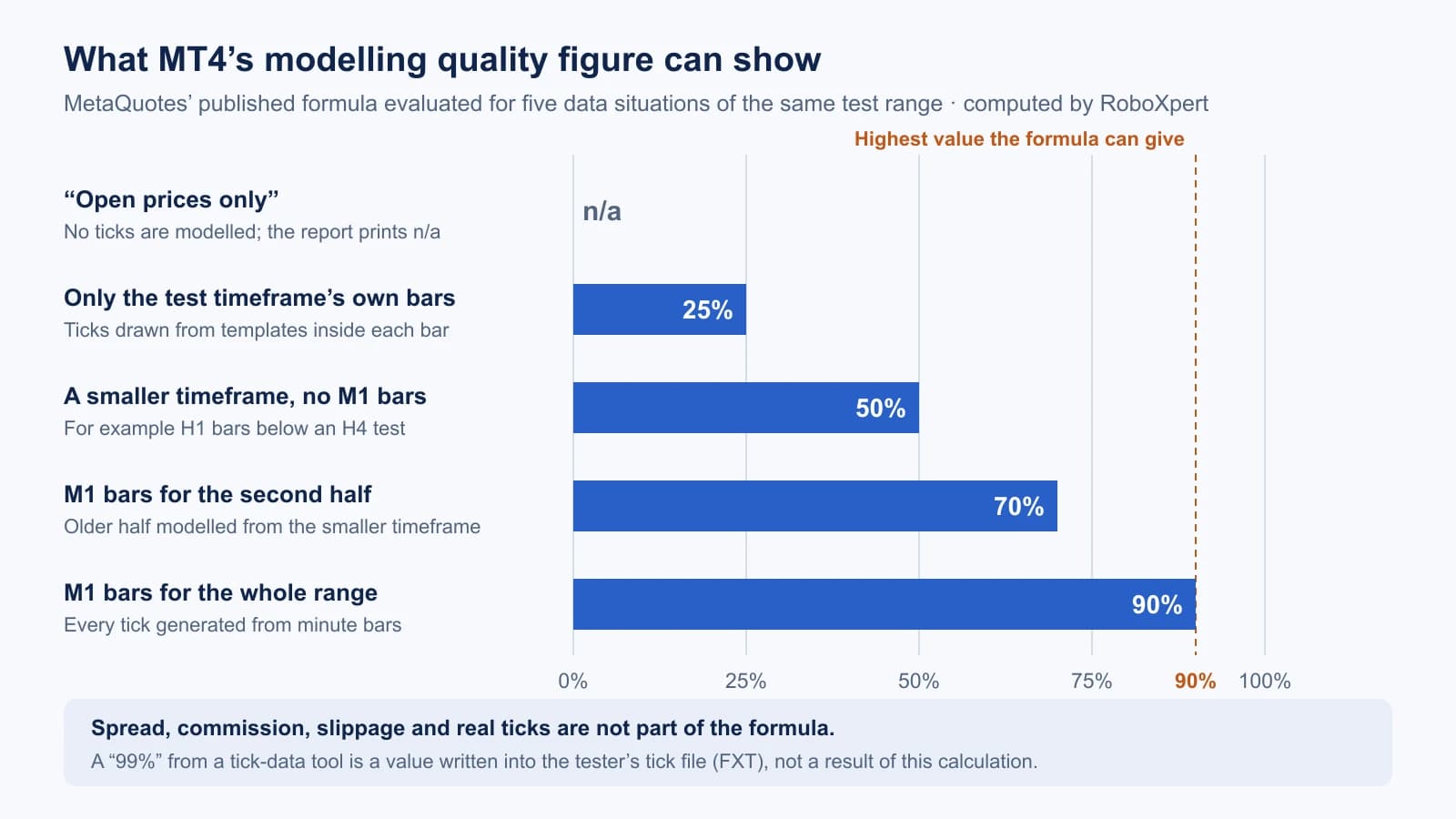
Three consequences follow from the formula:
- 90% is the ceiling with minute data. If every bar of the test is modelled from M1 bars, the result is 0.9, so 90%. A higher figure cannot come from this calculation.
- 25% means no smaller timeframe was found. The ticks were drawn from templates inside the test timeframe’s own bars. MetaQuotes marks those stretches pink: “pure fractal modeling without data of a smaller timeframe”.
- “n/a” means “Open prices only”. The results help says that in this mode the band under the figure is red and the field shows “n/a” (no modeling was performed).
Nothing in the formula looks at the spread, the commission, slippage, or whether the generated path resembles the real one. A 90% test with a 1-point spread and a 90% test with a 20-point spread carry the same figure.
The message “mismatched charts errors” in the journal is not defined in the MT4 help. Guides such as EarnForex’s explain it as bars of different timeframes that do not agree, for example an M1 high above the high of the H1 bar that contains it. If it appears, check the history before trusting the result.
Why 99% modelling quality is not a measurement
Screenshots of MT4 reports with “99%” or “99.90%” modelling quality usually come from a tick-data tool. These tools feed recorded ticks into the MT4 tester through the tester’s tick file (FXT) and write the percentage into that file. Tick Data Suite advertises “Everything you need to get 99% modeling quality in your MT4 backtests” on its product page.
The support team of Tickstory, a comparable tool, explained the number on its forum on 17 June 2025: “The 99.9% is also a superficial number that is within the FXT file itself.” They use it to check “if the user has correctly used the tick data that Tickstory has exported”. About MT4’s own figure they write that it “is usually <90% due to the fact it's using interpolated/guessed data” and that “this number is determined before the test even begins.”
So a 99% figure tells you that a tick file from such a tool was used. It does not tell you where the ticks came from, which spread and commission were set, or whether slippage was simulated, and as a value stored in the file it is only as trustworthy as whoever produced the file. Ask for those settings instead of reading the percentage.
What Tick Data Suite changes in MT4
Tick Data Suite, offered on eareview.net, is the best-known add-on for this gap. According to its product page, checked on 18 October 2026, it:
- “integrates seamlessly with MT4, making backtesting on real data as simple as checking a box”,
- lets the test “use the actual, variable spread that is recorded in the tick data”, or adjust it,
- can simulate slippage with several methods and override leverage, lot settings and commission.
The prices listed are €32.9 per month, €174 per year or €499 for a lifetime licence, with a 14-day trial. It runs only on Windows; the page lists macOS and Linux as not supported. For MT5, the page says “Tick Data Suite for MT5 is currently in beta”. We have not tested the product.
What such a tool fixes is the price path and the cost model of the MT4 tester, which is a real improvement for EAs that trade inside a bar. Two things it cannot fix:
- The data is usually not your broker’s. Unless it was recorded at your broker, tick data comes from another price feed than the server you will trade on. Spreads, quotes at rollover and price spikes differ between brokers.
- It does not test the idea. An EA whose parameters were tuned to the past stays tuned to the past, whatever the quality figure says.
So the colleague’s claim holds for one reading: if you must backtest a scalping EA in MT4, a tick-data tool with variable spread and slippage is close to necessary. For everything else, testing the MT5 version of the EA on the broker’s own ticks is the more direct route, where an MT5 version exists. An MT4 EA does not run in MT5; our guide on MT4 vs MT5 for Expert Advisors explains why.
Where the MT5 Strategy Tester is more accurate
MT5 offers five modes. In “Every tick based on real ticks”, MetaQuotes writes, “testing is performed using real ticks of financial instruments, accumulated by brokers. No simulation is performed.” The tick help names the main gain: with real ticks “a spread may change within a minute bar, whereas when generating ticks within a minute, a spread fixed in the appropriate bar is used.” Add the optional execution delay and the multi-currency tester, and MT5 can simulate conditions MT4 cannot.
The other modes, “Every tick”, “1 minute OHLC” and “Open prices only”, generate prices from minute bars, much as MT4 does. MetaQuotes itself warns about the coarse ones. In The Fundamentals of Testing in MetaTrader 5 it explains that 1 minute OHLC makes it “possible to create a ‘Testing Grail’, which shows a nice upward graph of the testing balance”, and that “once we launch it online, the truth begins to get revealed”. That is the colleague’s complaint about MT4, written by MetaQuotes about an MT5 mode.
Real ticks also have a limit: they exist only as far back as the broker stored them. MetaQuotes’ article on testing on real ticks says you can test on real data “if the broker has all history of the required symbols”, and that where real ticks are absent “the tester simulates the price just like in the ‘Every tick’ mode.” The report shows how much was real:
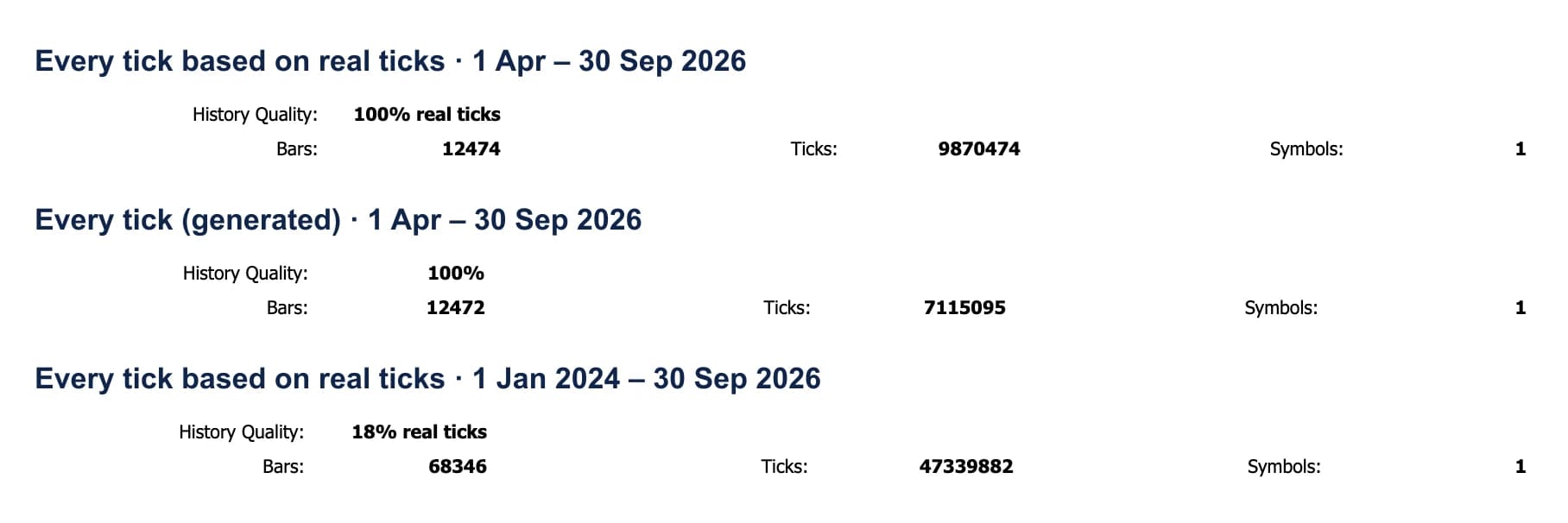
Our demo server has real EURUSD ticks only from 1 April 2026. A test from January 2024 in the real-ticks mode therefore reports “18% real ticks”: most of it ran on generated ticks. And a test in the generated “Every tick” mode reports “100%” without the words “real ticks”. MT5’s History Quality, according to the report help, is “a percentage ratio of correct and incorrect one-minute data”, so 100% says the minute bars were complete, not that a single real tick was used. Read the words after the number.
Our test: one EA, four MT5 modes
Claims about tick accuracy are easy to make and rarely measured. We ran two EAs on EURUSD from 1 April to 30 September 2026, the period in which our server has real ticks, in all four price modes of the MT5 tester. Everything else stayed the same: build 6230, 10,000 USD deposit, inputs as in the source. Real ticks are explained on our glossary page, which shows the MACD runs as report excerpts.
- MACD Sample, the example EA MetaQuotes ships with MT5, on H1. It decides at most once per bar and holds trades for days.
- RX_Range_Breakout, the EA from our guide on building an MT5 EA with AI, on M15. It trades the breakout of the night range with a stop and a target, risks 1% of equity per trade and closes at 21:00 server time.
The table lists the eight runs. Only one mode changed the MACD EA noticeably, while all three generated modes left the range EA about 600 points below its real-tick result.
Scroll horizontally if needed
| EA | Mode | Trades | Net profit (USD) | Price result (points) |
|---|---|---|---|---|
| MACD Sample | Every tick based on real ticks | 31 | −104.64 | −530 |
| MACD Sample | Every tick | 31 | −96.04 | −444 |
| MACD Sample | 1 minute OHLC | 31 | −143.94 | −923 |
| MACD Sample | Open prices only | 2 | −13.01 | – |
| RX_Range_Breakout | Every tick based on real ticks | 129 | +1,071.65 | +2,204 |
| RX_Range_Breakout | Every tick | 129 | +929.78 | +1,608 |
| RX_Range_Breakout | 1 minute OHLC | 129 | +925.00 | +1,598 |
| RX_Range_Breakout | Open prices only | 129 | +925.00 | +1,598 |
Net profit is the tester’s figure after commission. The price result adds up exit price minus entry price of every trade in points, so it is not affected by the lot size, which the range EA sets from the equity before each trade. For the slow MACD EA, only “Open prices only” changed the picture: it made 2 trades instead of 31. Between real and generated ticks, the 31 trades stayed the same and none differed by 5 pips or more.
The range EA is where the tick model mattered. Our script paired its 129 trades across the modes:
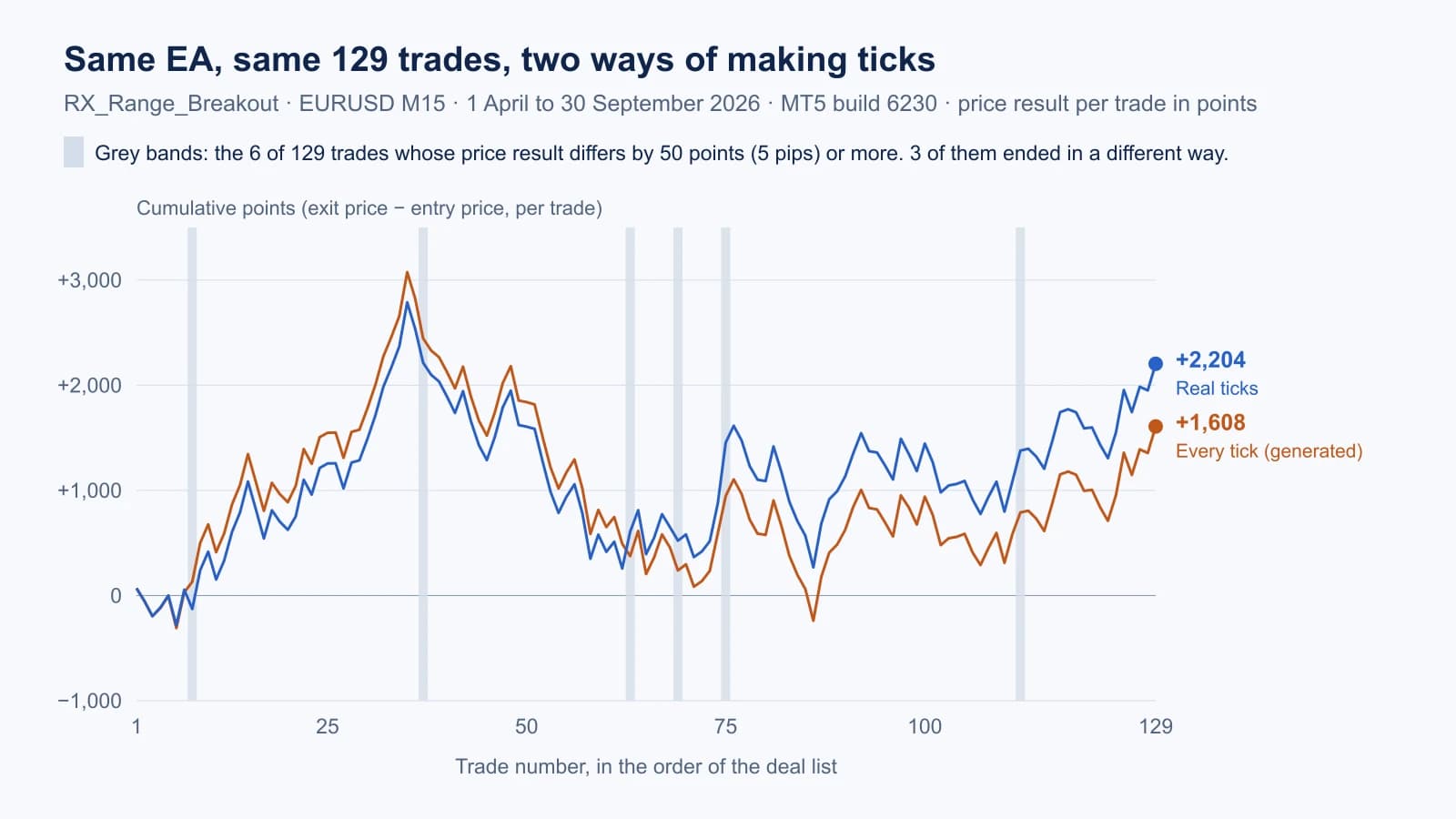
- 6 of 129 trades differed by 50 points (5 pips) or more. Most of the remaining differences were a few points.
- 3 trades ended in a different way. On 26 June, the real-tick run bought at 08:30 and hit its target at 15:51 for +351 points; the generated run entered at 15:00 and was closed at 21:00 for −117. On 10 April it went the other way: the real-tick run was stopped out for −184 points, the generated run entered five hours later and closed with +103.
- 3 targets were filled beyond the target price with real ticks. On 14 July the target was 1.14347; the price jumped past it within seconds at 15:30 and the tester filled at 1.14579, 232 points better. The generated run filled at 1.14355. With 4 September (89 points) and 7 August (33 points), these fills account for 354 of the 596 points between the two runs.
Six trades also entered in a different minute. The EA checks the spread before every entry and skips it above 30 points; with real ticks it sees the spread of each tick, with generated ticks the one stored in the minute bar. We did not keep the EA journals of these runs, so we cannot say which rule delayed each of those entries.
MetaQuotes’ own example shows the opposite direction. Its SimpleBreakOut EA on EURUSD H1 in the first half of 2016 made +169.46 with 96 trades in 1 minute OHLC, −466.81 with 158 trades in Every tick and −97.24 with 156 trades on real ticks. The article explains that the strategy “is highly dependent on the modeling method – namely, a number of incoming ticks and an order of their arrival.” Two tests are not a rule; both say that the tick model matters for some EAs and not for others.
Download reports and script (ZIP). The original MT5 reports of both EAs in all four modes, the Python script that pairs their trades, its output, checksums and an MIT licence. No executable, no account data.
Why EAs that backtest well fail live
If every EA that looks good in an MT4 backtest failed live, the cause would have to be something that also affects MT5. The research points at that cause: trying many variants and keeping the best.
Bailey, Borwein, López de Prado and Zhu prove that “high performance is easily achievable after backtesting a relatively small number of alternative strategy configurations”. With five years of data, “no more than 45 independent model configurations should be tried, or we are almost guaranteed to produce strategies with an annualized Sharpe ratio IS of 1, but an expected Sharpe ratio OOS of zero.” IS is the tested period, OOS the period after it. The optimiser in MT4 or MT5 can test thousands of configurations in an afternoon.
Harvey and Liu note that “a common practice in evaluating backtests of trading strategies is to discount the reported Sharpe ratios by 50%”, and argue that “it is a serious mistake to use the usual 50% haircut”: the right discount depends on how many strategies were tested.
A backtest can fail live for four separate reasons, and the tester only addresses the first:
- The simulated prices and fills differ from real ones. Tick model, spread, slippage, delay. Real ticks and realistic costs narrow this gap.
- The rules were fitted to the past. No tick data fixes this; only testing on data the optimisation never saw does.
- The costs at your broker differ. Commission, swap and spread per account. Our cost-sensitivity analysis shows how quickly a small edge disappears.
- The market changed. A test on 2024 says little about a strategy’s behaviour in a different regime.
Our guide backtest vs live trading shows how to investigate a gap between the two step by step.
A news filter usually does nothing in a backtest
Many EAs pause around economic news releases. They get the dates either from the economic calendar built into MT5 or, in MT4 and MT5, by downloading a news list from a website. Neither source works in the Strategy Tester:
- The MT5 calendar is not available. MetaQuotes’ book MQL5 Programming for Traders states that “calendar functions cannot be used in the tester”; a call returns error 4014 (FUNCTION_NOT_ALLOWED). Its section on transferring the calendar to the tester adds: “The calendar is available for MQL programs only online.”
- Downloads are blocked. The MQL5 and MQL4 references both say: “WebRequest() cannot be executed in the Strategy Tester.”
Unless the EA loads a saved copy of the calendar in the tester, the backtest therefore trades through every release that the live EA would skip. The backtest then tests a different set of rules from the one you run, and the difference can go either way: the news trades may be the worst of the test or the best. An EA that does not check the error code may treat “no data” as “no news” without saying so. In a backtest of an EA with a news filter, a journal without a single message from the filter is a warning sign.
MetaQuotes describes the workaround: save the calendar to a file while the program runs online, then load that file in the tester. If an EA is sold with a news filter, ask how the filter gets its data in a backtest. We have not tested this behaviour ourselves for this guide.
Which EAs are most sensitive to the tick model
From MetaQuotes’ documentation and our two runs, the tick model matters most for EAs that:
- trade inside one bar: scalpers and EAs with stops and targets of a few pips. MetaQuotes recommends real ticks “if you are developing a scalping or arbitrage strategy”.
- count ticks or react to their order, such as the breakout EA in MetaQuotes’ example.
- use a spread filter or trade at news and rollover times, when real spreads and price jumps differ most from a bar-based model.
- place stop and pending orders that a fast move can skip, as in our three fills at 15:30. In “Open prices only”, MetaQuotes warns, “Stop Levels and pending orders may trigger at a price different from the specified one.”
EAs that decide once per bar and use stops much wider than a minute’s range, like the MACD Sample in our test, are much less affected. For them, the cost model and the risk of overfitting matter more than the tick source.
Check an MT4 or MT5 backtest before you trust it
Use these questions on any report, including a seller’s screenshot:
- Which platform, build and mode? In MT4: Every tick, Control points or Open prices only. In MT5: real ticks or one of the generated modes.
- Where do the ticks come from? MT4 History Center, the broker, a tick-data tool and its data source. In MT5, read whether History Quality says “real ticks” and which share.
- Which spread? In MT4 one fixed value: which one, and is it realistic for the broker at all hours? In MT5 with real ticks, the broker’s.
- Are commission, swap and slippage in the result? A report without commission on a commission account overstates the result.
- Was a delay simulated? MT4 has none; in MT5 check the delay setting.
- How many variants were tried before this one? Ask for the optimisation and for a period the optimisation did not use.
- Does the EA use a news filter? If so, how does it get its data in the tester? Without a saved calendar, the backtest ran without the filter.
- Is there a forward test or a live record? Our guide on verifying EA trading results shows how to read one.
A modelling quality of 90% or 99%, or a History Quality of 100%, answers none of these questions on its own. The guide on how to read an MT5 Strategy Tester report goes through the rest of the report figure by figure.
Frequently asked questions
Is MT5 backtesting more accurate than MT4?
Only in the real-ticks mode, and only for the period in which the broker stored real ticks. There MT5 uses the recorded prices and a changing spread, which MT4 cannot do without an add-on. MT5’s generated modes model prices from bars, like MT4.
Do I need Tick Data Suite for MT4 backtests?
For EAs that trade inside a bar, scalpers in particular, a tick-data tool with variable spread and slippage brings the MT4 tester much closer to real conditions. For an EA that decides once per bar with wide stops, the gain is smaller. If an MT5 version of the EA exists, testing it on your broker’s real ticks needs no add-on.
Is 90% modelling quality good enough?
90% means the ticks were generated from M1 bars for the whole test, the best MT4 can do on its own. It says nothing about the spread, costs or slippage used. Whether it is good enough depends on how sensitive the EA is to the price path inside a minute.
Why does my MT4 backtest show 25% modelling quality?
The tester found no bars of a smaller timeframe for the tested period and generated ticks from templates inside the test timeframe’s bars. Download M1 history in the History Center and run the test again.
Does a news filter work in the MT5 Strategy Tester?
Not with the built-in economic calendar: MetaQuotes states that calendar functions cannot be used in the tester, and web downloads are blocked there too. The filter only works in a backtest if the EA loads calendar data saved to a file beforehand.
What does History Quality 100% mean in MT5?
That the minute bars of the tested period were complete and consistent. Only “100% real ticks” means the test ran on recorded ticks throughout.

Sources & further reading
- MetaTrader 4 Help: Strategy Tester settings (modelling modes and spread)
- MetaTrader 4 Help: testing results and modelling quality
- MetaTrader 4 Help: History Center
- MetaQuotes: Strategy Tester: Modes of Modeling during Testing (2005)
- MetaQuotes: Testing Features and Limits in MetaTrader 4 (2005)
- MetaQuotes: What the Numbers in the Expert Testing Report Mean (2006)
- MetaTrader 5 Help: strategy testing and modelling modes
- MetaTrader 5 Help: real and generated ticks
- MetaTrader 5 Help: testing report and History Quality
- MetaQuotes: Testing trading strategies on real ticks (2016)
- MetaQuotes: The Fundamentals of Testing in MetaTrader 5 (2011)
- MetaQuotes: MetaTrader 5 vs MetaTrader 4 comparison
- MetaTrader 4 release notes
- MQL5 Programming for Traders: Economic calendar (calendar functions in the tester)
- MQL5 Programming for Traders: Transferring calendar database to tester
- MQL5 Reference: WebRequest
- MQL4 Reference: WebRequest
- Tick Data Suite product page (eareview.net)
- Tickstory support forum: what the 99.9% modelling quality means (17 June 2025)
- Bailey, Borwein, López de Prado, Zhu: Pseudo-Mathematics and Financial Charlatanism (Notices of the AMS, 2014)
- Harvey, Liu: Backtesting (Journal of Portfolio Management, 2015)
Your next question