Learn
EA Lot Size Explained: Fixed Lot, Risk Percent and Capital Needed
At a glance
An EA’s lot setting decides how much money each price move gains or loses. The same 0.10 lots with a 20-pip stop loses $20, which is 4% of a $500 account and 0.4% of a $5,000 account. A fixed lot ignores the balance; a risk-percent setting needs a stop distance and can fall below the broker’s minimum volume. Leverage changes the margin, not the loss per pip. There is no universal minimum deposit: work it out from the symbol specification and the largest volume the EA can hold.
On this page
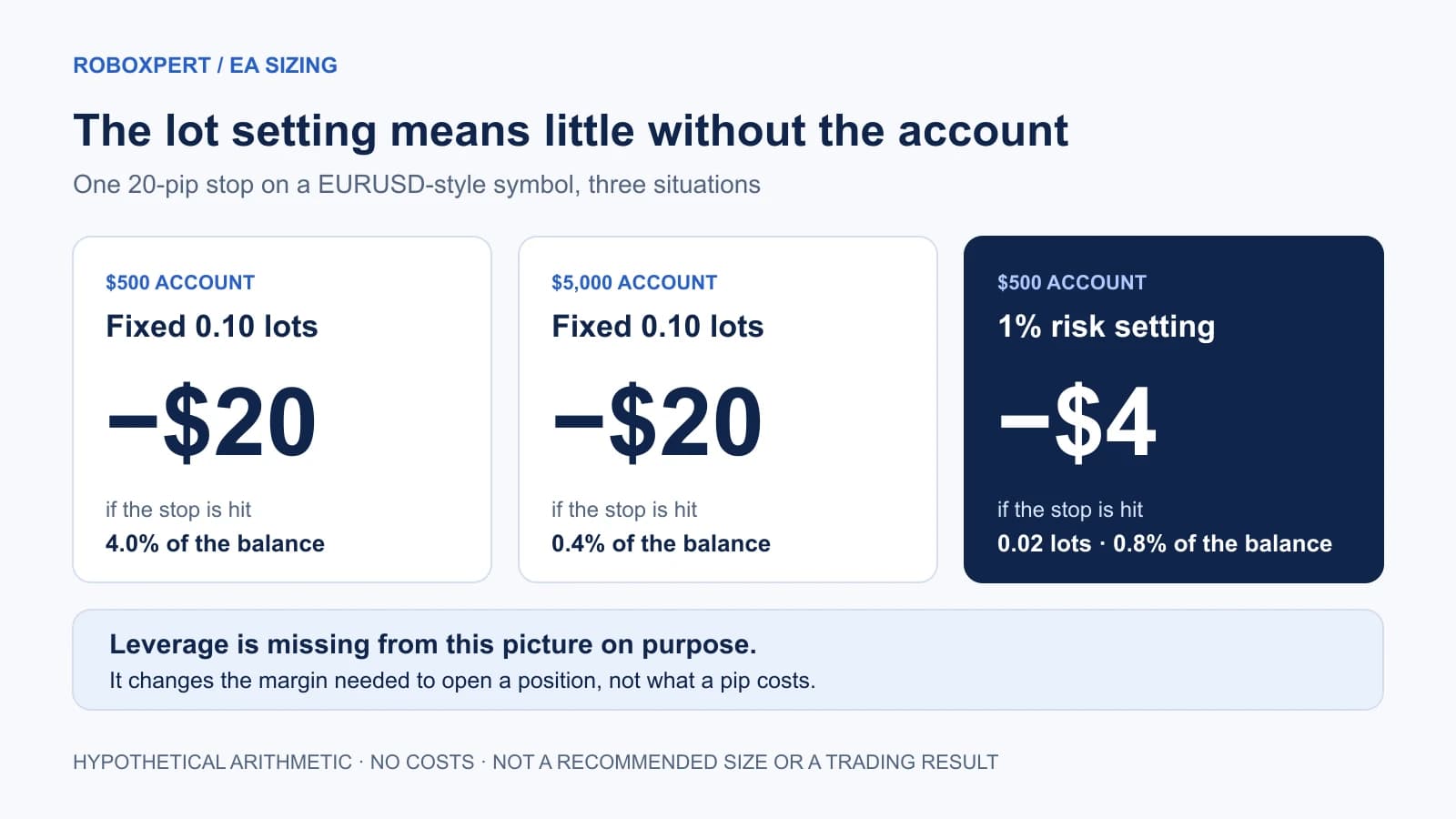
An EA’s lot setting decides how much money each price move gains or loses. Whether that amount is small or dangerous depends on the account behind it. The same 0.10 lots with a 20-pip stop loses $20. That is 4% of a $500 account and 0.4% of a $5,000 account.
This guide shows how to read the setting before you run an EA: what a lot means on your symbol, how fixed-lot and risk-percent sizing differ, what leverage does and does not change, and how to work out the capital an EA needs. It recommends no lot size, leverage or deposit.
All figures are hypothetical arithmetic for a EURUSD-style symbol on a USD account: contract size 100,000, minimum volume and volume step 0.01 lots, price 1.1000. They exclude spread, commission, swap and slippage. Platform documentation was checked on 1 October 2026. RoboXpert develops its own trading software, including a risk utility, and has a commercial interest in this subject. AI assisted with research and drafting. See our editorial disclosure.
What a lot is on your symbol
A lot is a contract unit, and its size belongs to the symbol. MetaTrader’s specification window defines contract size as the “number of units of the commodity, currency or financial asset in one lot.” In MetaQuotes’ own margin example, one EURUSD lot is 100,000 euros. An index or metal can use a completely different contract size, so 0.10 lots on one symbol says nothing about 0.10 lots on another.
Open the specification before trusting any lot number: right-click the symbol in Market Watch and choose Specification. MetaTrader’s help lists the fields. Four of them control sizing:
Scroll horizontally if needed
| Field | What it tells you | Why an EA user needs it |
|---|---|---|
| Contract size | Units in one lot | Converts lots into money per price move |
| Minimal volume | Smallest volume of a deal | The floor below which the EA cannot reduce its risk |
| Volume step | Smallest change in volume | Calculated volumes are rounded to it |
| Margin settings | How the required margin is calculated | Decides whether the volume can be opened at all |
Points and pips are not the same thing. MetaTrader works with a symbol’s point and tick size. “Pip” is a trader convention. On a EURUSD quote with five decimals, one pip (0.0001) equals ten points. An EA input that says StopLoss = 200 may mean 200 points, which would be 20 pips. Read the EA’s documentation before changing such a value by a factor of ten.
What one position can lose
For Forex and CFD symbols, the MQL5 reference gives the profit calculation as:
(close price − open price) × contract size × lots
The result is in the symbol’s profit currency. In our example that is the account currency, so no conversion is needed. A 20-pip move is 0.0020, and one lot is 100,000 units, so one full lot moves $200. Smaller volumes scale in proportion.
Scroll horizontally if needed
| Account balance | Fixed lot | Loss at a 20-pip stop | Share of the balance |
|---|---|---|---|
| $500 | 0.01 | $2.00 | 0.4% |
| $500 | 0.10 | $20.00 | 4.0% |
| $5,000 | 0.10 | $20.00 | 0.4% |
| $5,000 | 1.00 | $200.00 | 4.0% |
The money column depends on the lot. The percentage column depends on the lot and the account. A seller’s screenshot with a lot size but no balance is missing half the information.
Put the lot setting next to the account
A hypothetical EURUSD-style symbol on a USD account: contract size 100,000, minimum volume and step 0.01 lots, price 1.1000. Costs and execution are not modelled.
Enable JavaScript to change the scenario. The tables below show the same calculation: 0.10 lots with a 20-pip stop loses $20, which is 4% of a $500 account and 0.4% of a $5,000 account.
- Volume per position
- 0.10 lots
- Loss if one position hits its stop
- $20.00 · 4.00%
- Total volume open
- 0.10 lots
- Margin for 0.10 lots at 1:100
- $110.00 · 22.0%
A fixed lot ignores the balance. Change the balance and only the percentages move.
Percentages are shares of the balance entered. Leverage changes the margin, not the loss per pip. Spread, commission, swap and slippage are excluded, and a stop loss is a request, not a guaranteed exit price. Nothing is saved or sent.
Fixed lot vs risk percent
Most EAs size positions in one of three ways. The input names vary; the logic behind them does not.
Scroll horizontally if needed
| Fixed lot | Risk percent per trade | Lot per balance | |
|---|---|---|---|
| What you set | A volume, such as 0.10 | A share of the balance, such as 1% | A ratio, such as 0.01 lots per $1,000 |
| What stays constant | Money per pip | Planned loss as a share of the balance | Volume relative to the balance |
| Needs a stop distance? | No | Yes | No |
| After losses | Same volume on a smaller account, so each loss weighs more | Volume shrinks with the balance | Volume shrinks with the balance |
| Main weakness | Ignores the account entirely | Fails when the result is below the minimal volume | Ignores how far away the stop is |
Risk-percent sizing works backwards from the loss you accept. With a $500 balance, 1% is $5. At a 20-pip stop one lot would lose $200, so the calculated volume is 0.025 lots. The volume step is 0.01, so the EA has to round down to 0.02 lots. The planned loss becomes $4, or 0.8%.
Now take a $100 account with the same settings. 1% is $1, and the calculated volume is 0.005 lots, which is below the 0.01 minimum. There is no valid volume that keeps the loss at 1%. The minimum volume would lose $2, which is 2% of that account.
What an EA does at this point is a design decision, and you should know the answer before running it:
- It can skip the trade. The risk limit holds, but the EA may stay silent for reasons that look like a fault.
- It can trade the minimal volume anyway. It trades, but at twice the risk you set in this example.
- It can send the invalid volume. The server refuses it; the documented return code is 10014, “Invalid volume in the request.”
In our example the minimum volume fits a 1% limit from a $200 balance at a 20-pip stop, and from $1,000 at a 100-pip stop. That is arithmetic for these assumed values, not a recommended account size.
Leverage and margin: can the position be opened and kept?
Leverage does not appear in the loss formula. It appears in the margin, the part of your balance the broker blocks while a position is open. For Forex symbols, MetaTrader’s margin documentation gives:
volume in lots × contract size ÷ leverage
MetaQuotes’ example: one EURUSD lot at 1:100 needs 1,000 EUR. The amount is then converted into the deposit currency at the current rate. Other instrument types use other formulas, several of which include the open price.
Scroll horizontally if needed
| Volume | Leverage | Margin at 1.1000 | Share of a $500 balance | Loss at a 20-pip stop |
|---|---|---|---|---|
| 0.10 lots | 1:30 | $366.67 | 73.3% | $20.00 |
| 0.10 lots | 1:100 | $110.00 | 22.0% | $20.00 |
| 0.10 lots | 1:500 | $22.00 | 4.4% | $20.00 |
The last column never changes. Higher leverage does not make a pip more expensive. It lets the same balance open more volume, and more volume is what raises the loss. An EA that sizes by “free margin” will therefore trade larger on a high-leverage account unless something else limits it.
Margin also decides how long positions can be kept. The platform reports a margin level, equity divided by margin, in percent. With $500 of equity and $366.67 of margin it is about 136%. The account has a margin call level and a stop out level; MetaQuotes’ programming guide describes the stop out as the level “at which the most unprofitable position will be forced to close.” Your broker sets both values, in percent or in money. Look them up for the account you would use.
An EA does not have to reproduce these formulas. The platform exposes OrderCalcMargin and OrderCalcProfit, which return amounts in the account currency for the current market. If a request needs more margin than is free, the documented server answer is 10019, “There is not enough money to complete the request.”
When an EA holds several positions
A single-position example understates what many EAs do. Grid, averaging and basket systems hold several positions at once, and what matters is the total volume.
Ten positions of 0.01 lots are 0.10 lots. If the price moves 100 pips against all of them, the loss is $100. On a $1,000 account that is 10%, from an EA whose input says “0.01.” At 1:100 the ten positions need $110 of margin in our example.
Three things make the total grow:
- More positions. Find the maximum the EA may open, not the typical number.
- Larger positions after losses. A lot multiplier increases volume with every step. Our grid vs martingale guide shows how fast that compounds.
- Other systems on the same account. Several EAs share one balance and one margin. See multiple EAs on one MT5 account.
How much capital does an EA need?
There is no meaningful universal amount. A “minimum deposit” in a product description is a claim about someone else’s assumptions. You can work out your own figure in five steps.
- Find the largest total volume the EA can hold. Sizing mode, maximum positions and any multiplier come from its documentation or inputs. If the seller cannot tell you, that is an answer too.
- Read your symbol’s specification. Contract size, minimal volume and volume step, on the account you would use.
- Price the adverse move you plan for. Multiply the move by the contract size and the largest total volume. For an EA without fixed stops, use the largest equity drawdown in its record, scaled to your volume; our drawdown guide explains why balance drawdown is not enough.
- Check the margin at that volume. Compare it with the balance and with your broker’s stop out level.
- Decide what share of the account you accept losing. Capital needed is the planned loss divided by that share.
A short example with our assumed symbol: an EA can hold ten positions of 0.01 lots, and you plan for a 100-pip move against all of them. The planned loss is $100. If you accept losing 10% of the account to this EA, the calculation gives $1,000. If you accept 5%, it gives $2,000. Neither number says the EA is worth running; it only says the account would be large enough for the loss you planned.
If the result is more than you want to commit, reduce the volume. If the EA is already at the minimal volume, it does not fit that account.
Reader resource · TXT
Work out the sizing for your own EA and account
A blank record for the symbol specification, the EA’s sizing rules, your own calculation and the decision. No values supplied, no registration.
Get the sizing recordTools that enforce a limit can help once you have decided on one. RoboXpert’s own Risk Guard is a trade assistant and account-protection utility for MT5; we mention it as an example of the category, not as evidence about results. If the term “Expert Advisor” is still new, start with what an EA is and how it works.
Frequently asked questions
What lot size should I use on a $100 or $1,000 account?
We do not recommend a size. Take the loss you accept per trade in money, divide it by what one lot loses at your stop distance, and round down to the volume step. If the result is below the minimal volume, the account is too small for that risk limit on that symbol.
Does higher leverage increase my risk?
Not through the loss per pip, which depends only on volume and contract size. Higher leverage lowers the margin per lot, so the same balance can open more volume. Risk rises when you or the EA use that room.
Why does my EA not trade when I use a risk-percent setting?
One possible reason is that the calculated volume is below the symbol’s minimal volume, so the EA skips the trade. Check the Experts log, then compare your balance, risk setting and stop distance with the minimal volume. Our MT5 EA diagnostic guide covers the other causes.
Is 0.01 lots always the smallest volume?
No. Minimal volume and volume step are set per symbol by the broker. Read them in the specification window for the exact symbol and account type you will use.
Does a small lot make a grid EA safe?
A small lot per position limits each single position. The account carries the sum of all open positions. Work out the largest total volume before judging the risk.

Sources & further reading
- MetaTrader 5 Help: Market Watch and the symbol specification
- MQL5 Reference: symbol properties and profit calculation modes
- MetaTrader 5 Help: margin calculation for retail Forex and futures
- MQL5 Reference: OrderCalcMargin
- MQL5 Reference: OrderCalcProfit
- MQL5 Reference: account properties and stop-out modes
- MQL5 Programming for Traders: account margin settings
- MQL5 Reference: trade server return codes
Your next question