Learn
What Is an Expert Advisor? How Forex Robots Actually Work
At a glance
An Expert Advisor (EA) is a program for MetaTrader 4 or 5 that analyses prices and can send trading requests according to its programmed rules. “Forex robot” and “trading robot” are informal names for it; “trading bot” is the wider word for automated trading programs on any platform. An EA can trade only while its terminal is running with algorithmic trading allowed, and the broker’s trade server decides whether each request is completed. In this guide’s hypothetical example, one rule is followed through five moments and only one of them ends with a position. Automation carries out rules; it does not make them profitable.
On this page

An Expert Advisor (EA) is a program that runs inside MetaTrader 4 or MetaTrader 5, watches prices and can send trading requests according to rules written into its code. People also call it a forex robot, trading robot or trading bot. The program is the easy part to describe. What it needs around it, and what it cannot do for you, takes longer.
This guide explains the mechanism to someone who has never run an EA. It follows one hypothetical rule from a price update to the broker’s answer, compares EAs with the tools they are often confused with, and lists what has to be in place before one can trade. It does not recommend a robot or a strategy.
Platform documentation was checked on 1 October 2026. RoboXpert develops its own trading software, so we have a commercial interest in this subject. AI assisted with research and drafting. See our editorial disclosure and evidence methodology.
What “Expert Advisor” means: EA, forex robot and trading bot
“Expert Advisor” is MetaQuotes’ name for an automated trading program on its MetaTrader platforms. The MetaTrader 4 manual describes EAs as programs developed in MetaQuotes Language 4 (MQL4) and “used for automation of analytical and trading processes.” The MetaTrader 5 manual separates two kinds of application: trading robots “designed for performing trading operations” and indicators “used for analyzing prices and identifying patterns in price changes.”
You will read four terms for these programs. “Forex robot” and “trading robot” mean an Expert Advisor; “trading bot” is the wider word.
Scroll horizontally if needed
| Term you will read | What it usually refers to |
|---|---|
| Expert Advisor, EA | The MetaTrader program type. Precise, platform-specific. |
| Trading robot | MetaQuotes’ own everyday word for an Expert Advisor. |
| Forex robot | The same thing, named after the market where EAs became popular. EAs also trade other instruments a broker offers. |
| Trading bot | A general word for any automated trading program, on any platform. Every EA is a trading bot; many trading bots are not EAs. |
Two practical details follow from the definition. An MT4 EA is written in MQL4 and an MT5 EA in MQL5; the two are built separately, each for its own platform, so ask for the version made for the platform you use instead of assuming one file serves both. Our MT4 vs MT5 comparison covers the differences. And the name promises nothing: there is no expert inside and no advice. It is software that does what its code says.
How an EA works: from price tick to position
You attach an EA to a chart in the desktop terminal. MetaTrader 5 runs one EA per chart; attaching a second one to the same chart removes the first. From then on the program waits for events. The most important event is a tick, a new price quote for the chart’s symbol.
- A tick arrives. The terminal calls the EA’s tick handler. According to the MQL5 reference, this event is generated for EAs when a new tick arrives for the symbol of the chart the EA is attached to.
- The EA checks its rules. It reads prices, indicator values, the time and its own open positions, then compares them with its conditions. On most ticks the answer is “do nothing.”
- The terminal checks permission. If the rules call for a trade, the request only goes ahead when algorithmic trading is allowed, both for the platform and for this EA.
- The EA sends a request to the broker’s trade server. The request names the symbol, direction, volume and any stop loss or take profit.
- The server answers. It completes the request, completes part of it or refuses it, and reports a return code.
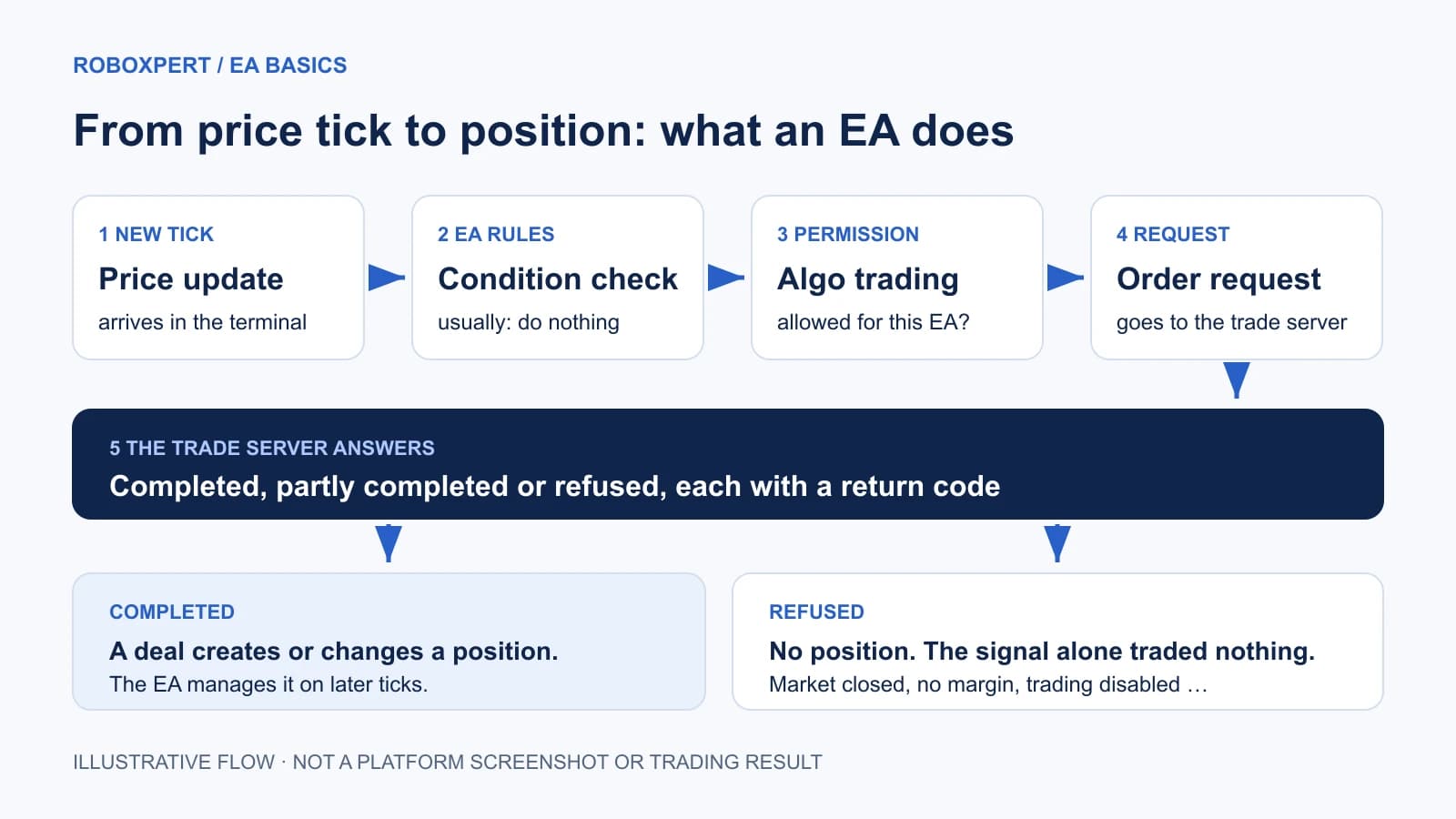
Three properties of this loop explain a lot of confusing behaviour:
- An EA does not necessarily see every tick. If a new tick arrives while the previous one is still being processed, the OnTick reference says the new event is not added to the queue. A slow EA skips price updates.
- A disabled EA keeps running. MetaQuotes notes that disabling Expert Advisors in the settings “only prohibits Expert Advisors from trading.” The program can keep calculating and logging signals while nothing is traded.
- The EA stops when its environment stops. EAs are unloaded when the terminal shuts down or the connected account changes, as the program-running reference describes. A closed laptop means no robot.
One rule, five outcomes
Take a deliberately simple, hypothetical rule. It is a teaching example, not a strategy we tested or recommend:
If this EA has no open position on EURUSD and the last completed 15-minute candle closed above its 50-period simple moving average, request a 0.01-lot buy with a stop loss. Otherwise do nothing.
The table follows that one rule through five different moments. Only the last one ends with a position.
Scroll horizontally if needed
| Moment | What the EA finds | What happens next | On the account |
|---|---|---|---|
| A | The candle closed below the average | The rule is not met. No request is made | Nothing. This is the normal case |
| B | The rule is met, but algorithmic trading is switched off in the terminal | The request is not carried out. Documented return code: 10027, “Autotrading disabled by client terminal” | No position, although the EA found a signal |
| C | The rule is met, trading is allowed, the market session is closed | The server refuses. Return code 10018, “Market is closed” | No position |
| D | The rule is met, trading is allowed, free margin is too low | The server refuses. Return code 10019, “There is not enough money to complete the request” | No position |
| E | The rule is met, trading is allowed, the request is valid | The server completes it. Return code 10009, “Request completed” | A deal, and a position at the price the server reports |
The codes and their wording come from the MQL5 reference for MetaTrader 5, in MetaQuotes’ list of trade server return codes. We did not run this rule on a trading account; which answer you would see depends on your terminal, your account and your broker. The list contains more cases, including partial completion (10010) and requotes (10004).
After moment E the situation changes. The condition “no open position” is now false, so the entry rule stays quiet and the EA’s exit logic takes over on later ticks. A real EA needs rules for that part too: when to close, what to do after a restart, and how to react when a request is refused.
If your own EA is installed and silent, our MT5 EA diagnostic guide works through these stages with real log messages.
What automation does not give you
An EA executes its instructions without hesitation, at any hour the terminal is running. That is its whole advantage, and it is a real one for rules that are tedious or easy to break by hand.
It does not follow that the rules are good. A program can follow a losing rule perfectly. Whether a particular EA’s results mean anything is a separate question with its own evidence; we cover it in Do Expert Advisors really work? and in backtest vs live trading.
An EA also knows nothing that was not written into it. It does not read your broker’s terms, notice that your account balance is needed elsewhere, or decide that today is unusual, unless someone coded a rule for it. Supervision stays with you.
EA vs indicator, script, copy trading and TradingView strategy
These tools sit close together in menus and marketing. The useful question for each is: who decides, and can it send an order to my account?
Scroll horizontally if needed
| Tool | What it is | Sends orders to your account? | Who decides the trade |
|---|---|---|---|
| Expert Advisor | A program attached to a MetaTrader chart that keeps running | Yes, when algorithmic trading is allowed | The programmed rules |
| Custom indicator | A program that calculates and draws values on a chart | No. The MQL5 reference lists order functions as prohibited in indicators | You, reading the chart |
| Script | A program that performs one task and is then unloaded | It can, once, for the task it was written for | You, by starting it |
| MetaTrader Signals (copy trading) | A service for “automatic copying of trading operations” from a provider’s account to yours | Yes, by copying the provider’s operations | The signal provider |
| TradingView Pine strategy | A script that simulates orders on chart data | No. TradingView states that automated strategy trading with a brokerage account “is not available on TradingView yet” | Nobody on your account; orders are simulated |
Sources, checked on 1 October 2026: MQL5 program types, MetaTrader 5 Signals and TradingView’s autotrading note.
The word signal causes most of the confusion. It can mean a line an indicator draws, an alert on your phone, a message in a chat group or MetaTrader’s copy-trading service. Only the last one places trades. If a product is sold as an “indicator with signals,” you are the one executing.
Alerts from TradingView can be forwarded to another service that trades for you. That is a separate product with its own costs and failure points, not a feature of the indicator. Our indicator vs strategy guide shows the difference with two matched scripts.
Three jobs an EA can have
Not every EA is a fully automatic robot. The program type covers at least three jobs.
- Fully automated trading. The EA finds entries, sizes positions and exits by itself. How it adds to positions matters more than how often it wins; see grid trading vs martingale.
- Trade assistance. You decide when to trade; the EA calculates the volume, places the order with its stops and manages the exit.
- Risk and utility tools. The EA trades no strategy. It enforces limits, closes positions under set conditions or records what you do.
RoboXpert’s own products are examples of the first and third kind: SkyWebR is a grid EA for EURUSD, and Risk Guard is a trade assistant and account-protection utility. We mention them to illustrate the categories. Their existence is not evidence that either category is profitable.
What you need before an EA can trade
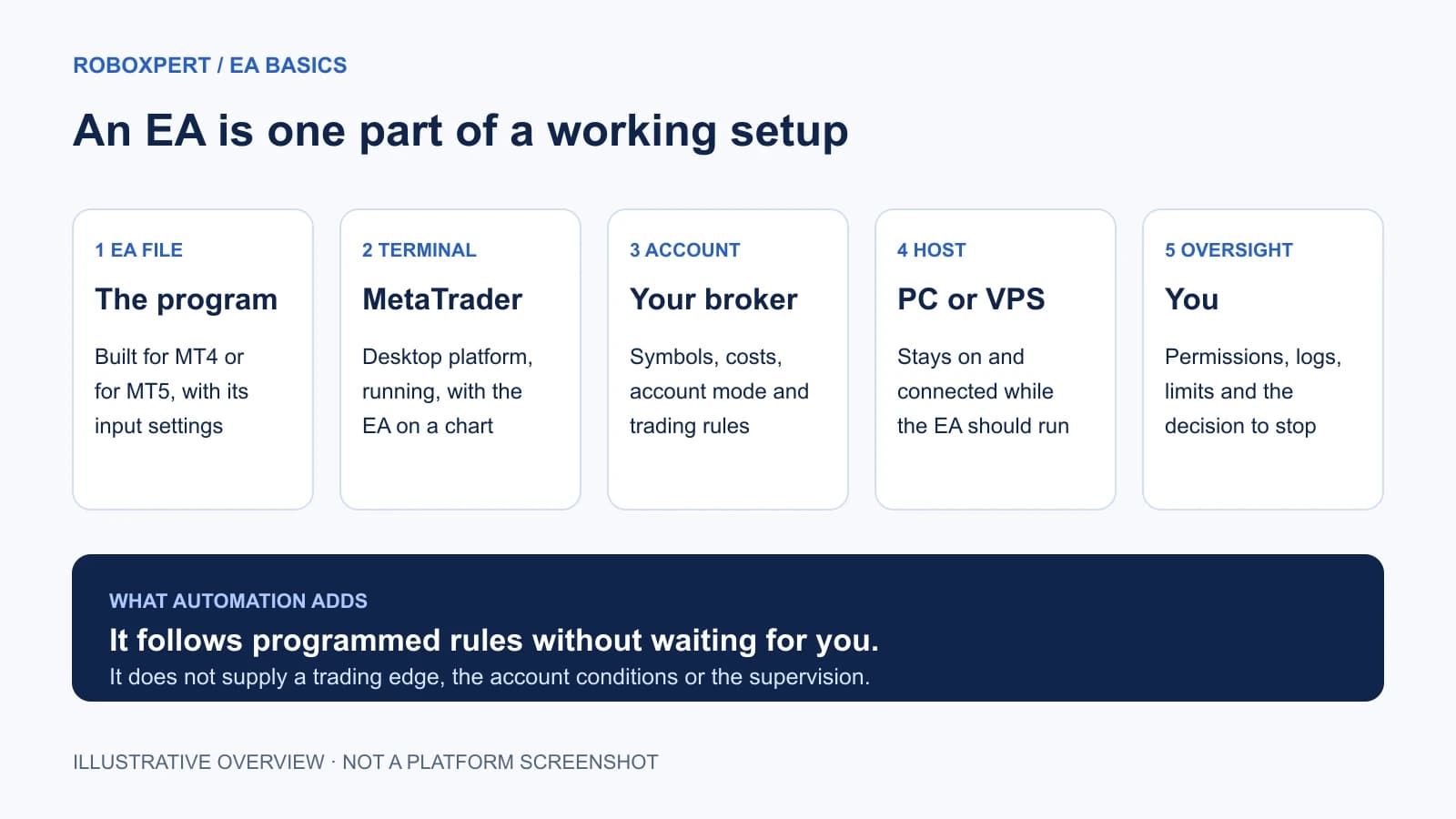
Before an EA can trade, five parts have to be in place, and the EA file is only one of them. The figure and the table show what each part contributes, what to check and where we cover it.
Scroll horizontally if needed
| Part | What it contributes | What to check | Where we cover it |
|---|---|---|---|
| The EA file | The rules and their input settings | Built for your platform version; documented settings | How to choose an EA |
| MetaTrader terminal | Runs the program and connects to the broker | EA attached to the right chart; algorithmic trading allowed | Install an EA in MT5, MetaTrader on Mac |
| Broker account | Symbols, costs, margin and trading rules | Account mode, minimum volume, whether your strategy type is permitted | Hedging vs netting |
| A host that stays on | Keeps the terminal running and connected | What happens after a restart or a lost connection | MetaTrader VPS vs Windows VPS |
| Your oversight | Limits, monitoring and the decision to stop | Who watches the logs, and what triggers switching it off | EA diagnostic guide |
MetaQuotes’ own hosting page gives the reason for the fourth row: a robot needs a “constant connection to a trade server and uninterrupted power supply,” which a home computer does not reliably provide. A VPS or the platform’s virtual hosting solves availability. It does not improve the rules.
Permissions deserve a careful first look. MT5 has a platform-wide switch for algorithmic trading and a separate permission for each EA. Further options allow DLL imports and web requests to listed addresses. Grant those only when the EA documents why it needs them. The platform settings reference describes each option.
Is an Expert Advisor “AI”?
Usually not. Most EAs are fixed rules: if this, then that. Three different things get sold under the same label:
Scroll horizontally if needed
| Claim | What it means | What to ask |
|---|---|---|
| Rule-based EA | Conditions written by a programmer. Same inputs, same decision | What are the rules, and how does exposure grow? |
| “Built with AI” | A person used an AI tool to help write ordinary rule-based code | Was the code reviewed and tested? By whom? |
| AI in the trading decision | A trained model, inside the EA or on an external service, influences entries or exits | Which data and services does it depend on, and what happens when one is unavailable? |
The third kind exists. MQL5 documents support for ONNX, “an open-source format for machine learning models,” which lets a program use a trained model in a trading strategy. A model does not remove the need for evidence. The U.S. Commodity Futures Trading Commission puts it plainly in its customer advisory: “AI technology can’t predict the future or sudden market changes.”
If you want to see the second kind in practice, our MT5 EA built with AI is a small, tested example that logs signals and sends no orders.
Where to go next
- You are looking at a specific EA: use the EA buying checklist.
- A seller shows you results: learn how to verify them on Myfxbook.
- You already have the file: follow the MT5 installation guide.
- You plan to run more than one: read multiple EAs on one MT5 account first.
Frequently asked questions
Is an Expert Advisor the same as a forex robot?
Yes. “Forex robot” and “trading robot” are informal names for an Expert Advisor. “Trading bot” is broader and also covers automated programs on other platforms and exchanges that have nothing to do with MetaTrader.
Can an EA trade while my computer is off?
Not on that computer. The EA runs inside the terminal and is unloaded when the terminal closes. To trade around the clock, the terminal has to run on a machine that stays on, such as a Windows VPS, or the EA has to be moved to MetaTrader’s virtual hosting. Each option has limits; our VPS comparison explains them.
Do I need to know programming to use one?
No. Running an EA means installing a file, choosing input settings and granting permissions. You do need to understand what the settings do, especially those that control position size and how many positions it may open; see EA lot size and capital. Programming matters when you want to build or change one.
Do all brokers allow Expert Advisors?
Offering MetaTrader is not the same as permitting every automated strategy. Account terms can restrict particular practices, and evaluation programmes from prop firms publish their own rules. Read the terms for the exact account you would use. Our FTMO review shows what such a rule check looks like for one provider.
Can I test an EA before risking money?
Yes, in two ways. MetaTrader’s Strategy Tester runs an EA on historical data, and a demo account lets it run on current prices without real funds. Neither result guarantees how it will behave on a funded account; backtest vs live trading explains why the three differ.

Sources & further reading
- MetaTrader 5 Help: Expert Advisors and custom indicators
- MetaTrader 4 Help: Expert Advisors
- MetaTrader 5 Help: creating and running Expert Advisors and indicators
- MetaTrader 5 Help: strategy testing
- MQL5 Reference: OnTick and the NewTick event
- MQL5 Reference: OrderSend and execution results
- MQL5 Reference: trade server return codes
- MQL5 Reference: how programs are loaded, run and unloaded
- MetaTrader 5 Help: platform settings for Expert Advisors
- MetaTrader 5 Help: trading signals and copy trading
- MetaTrader 5 Help: virtual hosting for 24/7 operation
- MQL5 Reference: ONNX models
- TradingView: how to autotrade using Pine Script strategies
- CFTC customer advisory: AI won’t turn trading bots into money machines
Your next question