Learn
MQL5 Market: How to Read an EA Page Before You Buy
At a glance
An MQL5 Market page mixes fields the seller writes with rules the platform sets. Description, screenshots, price, rent and the number of activations come from the seller. The Market rules decide who may review, that the free demo runs only in the Strategy Tester, and that a purchase cannot be returned. In our count of the first 210 MT5 Expert Advisors on 7 October 2026, 128 of 187 rated products had 4.5 stars or more, and 96 of the 187 had fewer than ten reviews. Read the stars last. Start with the update history, the demo in your own tester and the review texts.
On this page

The MQL5 Market is the shop built into MetaTrader. On 7 October 2026 its category page counted 16,630 Expert Advisors for MetaTrader 5 alone. Every product has a page with stars, a price and a description. This guide shows who fills in each part of that page and how much weight it can carry.
We use two things of our own. The first is a listing we publish ourselves, which serves as the example page. The second is a count of the first 210 Expert Advisors in the Market: their star ratings, the number of reviews behind them and their prices.
Disclosure: RoboXpert sells software on the MQL5 Market: Risk Guard, a trade assistant for manual traders, listed at 79 USD. It is a utility and places no trades on its own. We have a commercial interest in this subject. The rules and pages were read on 7 October 2026. AI assisted with research, counting and drafting. See our editorial methodology and commercial disclosure.
An MQL5 Market page in one picture
This is the top of our own listing as the website showed it on 7 October 2026. A page for an Expert Advisor has the same parts.
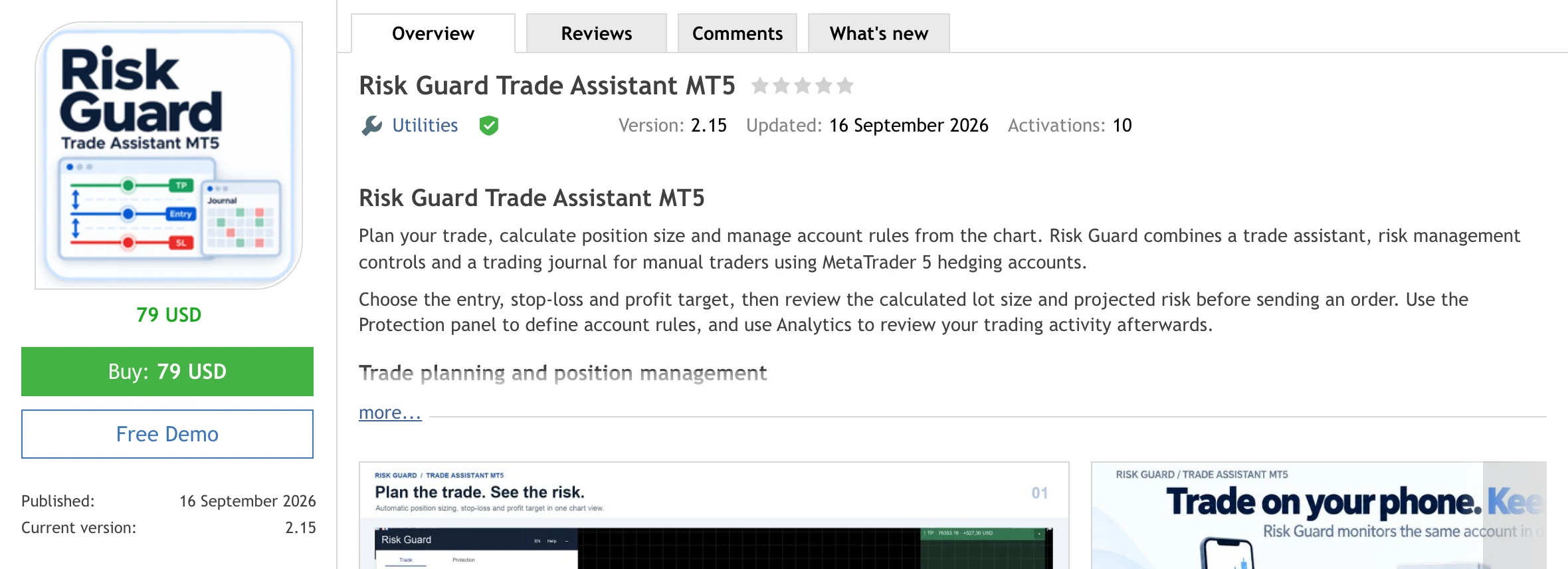
The table names each part, says who fills it in and what it can tell you:
Scroll horizontally if needed
| Part of the page | Who fills it in | What it tells you |
|---|---|---|
| Name, icon, description, screenshots, video | Seller | What the seller says the product does |
| Price and rent options | Seller, from 30 USD upwards | What access costs today |
| Free Demo button | MQL5, for every paid product | That you can run it in the Strategy Tester |
| Stars and the Reviews tab | Buyers only | How the people who paid judged it |
| Comments tab | Users and the seller; the rules name it as the place for product support | Questions, bug reports and how the seller answers |
| Published, Updated, Version, What’s new | Dates from the platform, release notes from the seller | Age of the product and how often it changes |
| Activations | Seller, between 5 and 20 | On how many computers one purchase works |
Our listing shows five empty stars. The product was published on 16 September 2026 and nobody has reviewed it yet. That is how every new product starts.
What the seller writes and what MQL5 sets
The description is the seller’s text. The Market rules limit what it may say. A product must not:
- “guarantee, promise or hint at profits through the Product name, logo, screenshots or description”
- “contain words and expressions in superlative degree relating to Product features or the underlying concept”
- “present trading strategy backtest results as real trading results, whether expressly or implicitly”
- “use links or images of awards, certificates or testimonials related to any trading achievements from brokerage firms or other third-party companies”
These are rules for sellers, and MQL5 decides how to enforce them. They give you a simple test: a page that hints at profits or shows a backtest curve as if it were an account is breaking the rules it was published under.
Three more parts are the seller’s decision: the price, whether the product can be rented, and the number of activations. A seller may also link a Signal, an account that MQL5 monitors. The rules name it as one of three ways to show how a paid product works: “add videos in the description; provide a one-month product rental option for a small fee; provide Expert Advisor monitoring results via the ‘Signals’ service.” None of the three is required.
MQL5 sets the rest: who may review, what the demo can do, how a purchase is tied to a computer and that it cannot be returned. The sections below take these one by one.
What MQL5 checks before a product is listed
Less than the word “Market” suggests. The rules say it in three sentences:
- “The Administration of the Market service does not guarantee the profitability of Expert Advisors (EAs, trading robots)”.
- “The Administration of the Market service provides only a formal test of the Product, checking its conformity with the functionality stated by the Seller.”
- “Passing the test successfully does not mean that the results stated in the Product description will be obtained in the future.”
The test is automatic. According to the rules, Expert Advisors “undergo automatic test in the Strategy Tester on the historical price data” and are “formally checked for known programming errors”. Products that pass “are published automatically”. MetaQuotes lists the checks in its article on the checks a trading robot must pass: insufficient funds for a trade, invalid volumes, stop levels too close to the price, division by zero and similar errors. None of them judges the strategy.
MQL5 does check the person. “The Administration checks the Seller’s identity documents”, and the seller’s name is public on the profile. Payment runs through MQL5, and the product file is delivered through the terminal. That removes the risk of paying a stranger and receiving nothing. It does not remove the risk of an Expert Advisor that loses.
What the star rating can tell you
Only a buyer can rate. The rules name two groups who may leave a review: “The Users who have purchased the product” and “The Users who have downloaded a full version of the Product distributed at no cost.” A user who only ran the demo cannot. The rules set no waiting time between purchase and review.
We counted the ratings on the first three pages of the category “Experts” for MetaTrader 5, in the order the page shows by default, on 7 October 2026. That is 210 products, the ones a visitor sees first.
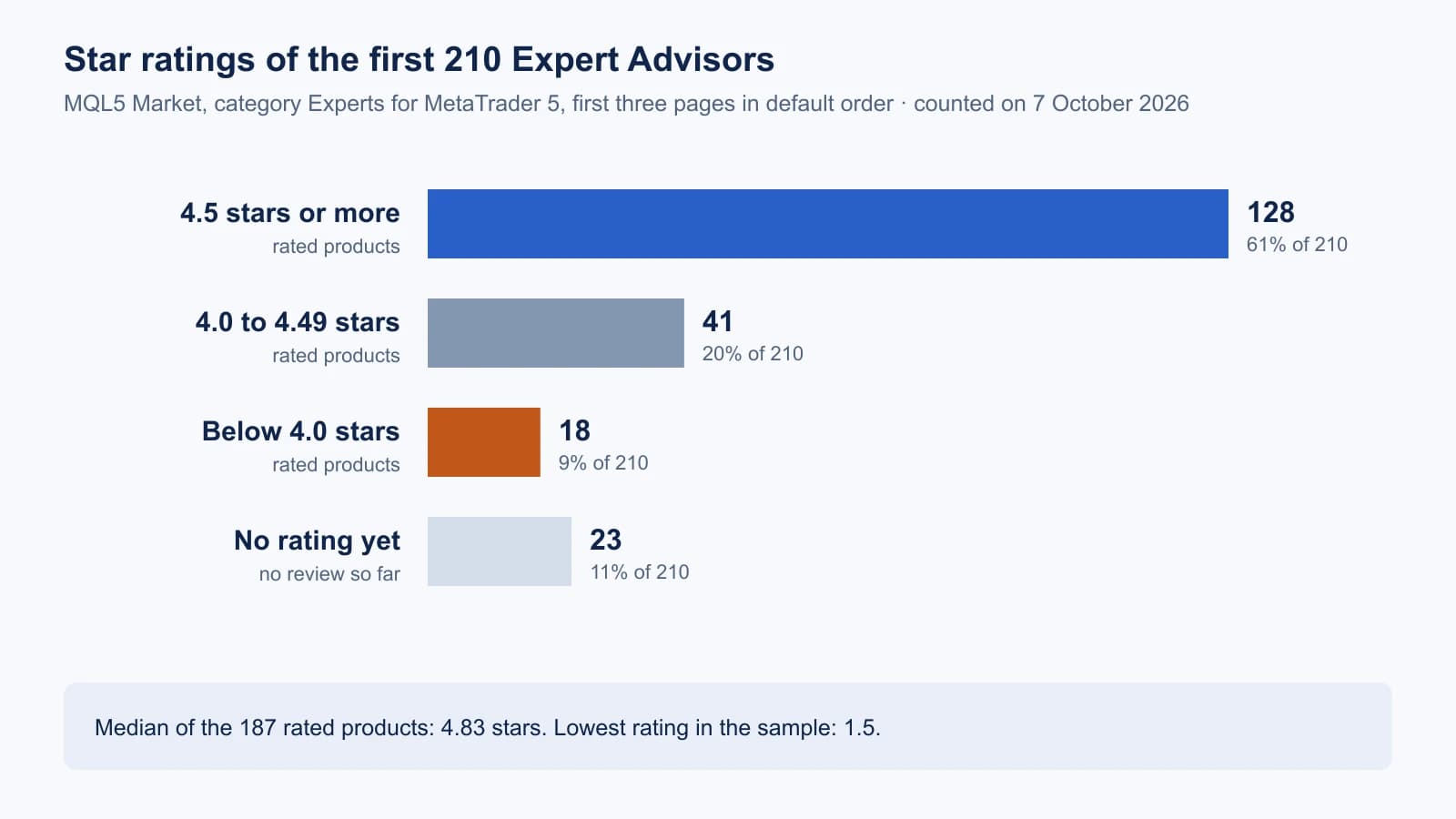
The same count as a table, with each group’s share of the rated products:
Scroll horizontally if needed
| Rating | Products | Share of the 187 rated |
|---|---|---|
| 4.5 stars or more | 128 | 68% |
| 4.0 to 4.49 stars | 41 | 22% |
| Below 4.0 stars | 18 | 10% |
| No rating yet | 23 | not rated |
The median of the rated products is 4.83 stars. When two out of three products score 4.5 or more, the score no longer separates them. The second count shows why a single rating moves so easily:
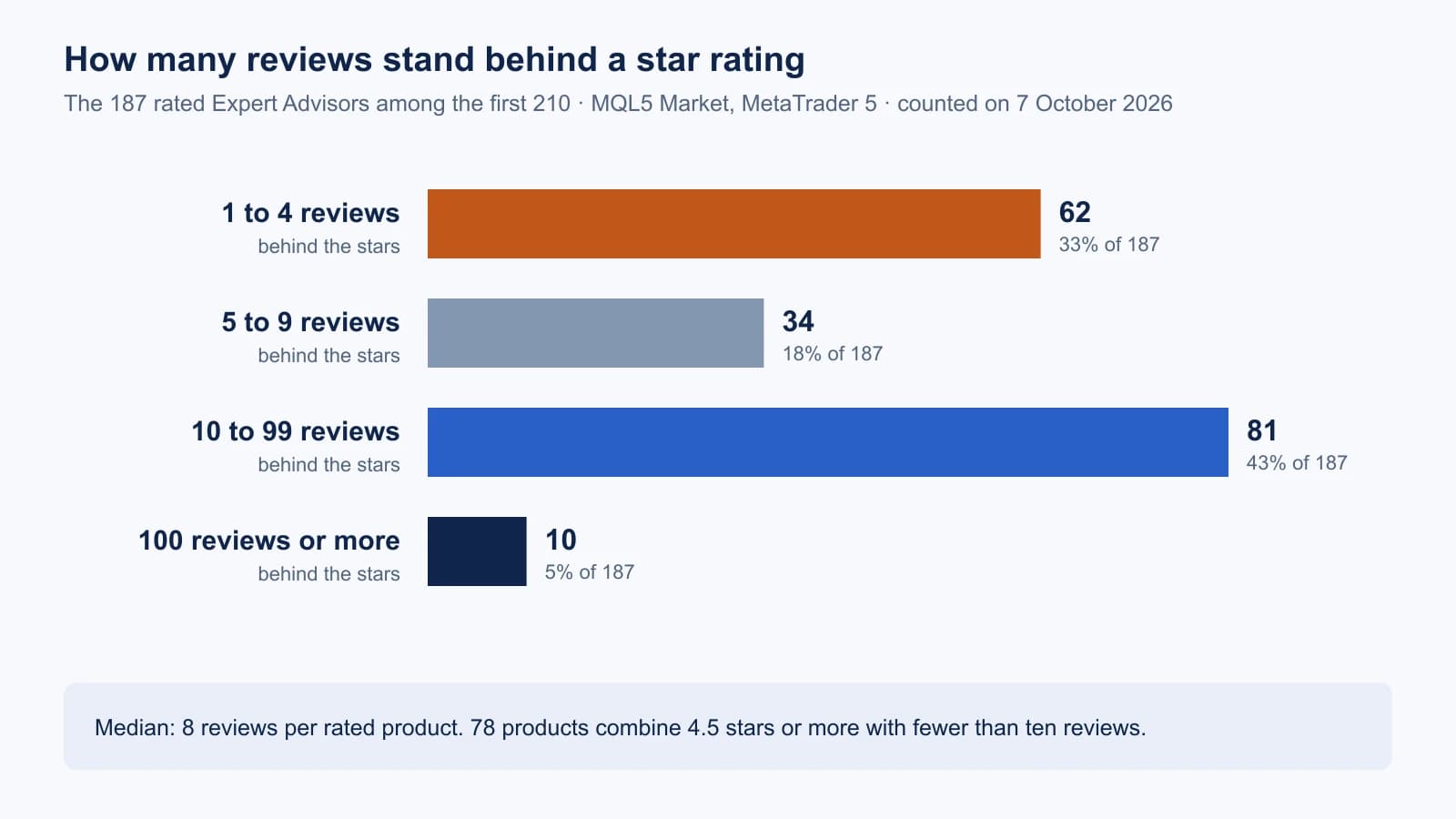
Half of the rated products, 96 of 187, have fewer than ten reviews. 78 products show 4.5 stars or more on fewer than ten reviews. With eight reviews, one buyer who gives one star moves a 5.0 to 4.5.
The count does not show why the ratings are high, and we did not examine single reviews. Two things follow from the rules alone. Every reviewer has paid, often several hundred dollars, and chose the product before judging it. And a review can be written on the first day, long before a strategy has been through a losing period.
Download scripts and counts (ZIP). The two scripts that save and count the category pages, and the counts of 7 October 2026. No product or seller names.
The free demo runs only in the Strategy Tester
Every paid product has a demo. MQL5 states the limit in its guide on purchasing a product: “Unlike the full product, the trial version can only run in the Strategy Tester.” The rules repeat it for Expert Advisors: a demo “cannot be run on an online chart of the client terminal. Its trading part can be tested only in the Strategy Tester”.
So the Free Demo button gives you a backtest on your own broker’s price history. It does not give you a forward test on a demo account. For that you need a purchase or, where the seller offers it, a rental.
The backtest is still worth doing, because it is the only result on the page that the seller did not produce. MetaQuotes lists the checks in its article on testing a robot before buying, among them a test with random delay, a test on another symbol and timeframe and a backtest over the time after the product was published. Use the last one first:
- Read the “Published” date on the page.
- Test the demo from that date to today, in the mode “Every tick based on real ticks” if your broker supplies them.
- Compare the result with the period before publication.
The seller could tune the product to everything before the release date. The time after it is new to the product, as long as no later update has changed the strategy. Check that in the What’s new tab.
Our guides explain the rest of the work: real ticks and the other test modes, how to read the Strategy Tester report and what a backtest cannot show.
Price, rent, activations and refunds
Price. The lowest price for a paid product is 30 USD. In our count, 189 of the 210 Expert Advisors were paid. Their prices ranged from 49 to 999 USD, with a median of 299 USD; 39 cost 500 USD or more. The remaining 21 were free. For free EAs, see our test of the 34 that ship with MetaTrader 5. Of every sale, MQL5 keeps a 20% commission from the seller.
Rent. Where a seller offers rent, the periods and prices stand under the Buy button. Our listing has none. According to MQL5, a rented product can be used “without limitations”, so a rental lets you run an Expert Advisor on a demo account without paying the full price.
Activations. A purchase is a licence for a number of computers. MQL5 describes it in the purchasing guide: “You are only granted the right to use this application on a limited number of computers. At the same time, a product can be used on an unlimited number of terminals within one computer.” The seller sets the number: “The minimum number of such Activations for each Buyer is 5, including the one used during the purchase. The maximum number is 20.”
An activation is spent more easily than the number suggests. The rules say the protection “does not allow to launch a Product, even if a hardware was substituted to the exactly the same one or if an operating system of the same type was reinstalled.” A new VPS, a reinstalled Windows or a new laptop each cost one. Count your machines before you buy a product with five activations. Our guide on MetaTrader VPS vs Windows VPS covers the hosting side. What EAs cost to buy, rent or have written, counted again on 31 October 2026, is in our guide to forex robot prices.
Refunds. The rule is one sentence: “Products purchased through the Market service can not be returned.” You can ask the seller to fix a critical error or a function that does not work as described, but only “if no more than one month has passed since the date of the Product purchase.” A strategy that loses money is not an error in that sense.
Launch prices and copies left
Many descriptions open with a sentence about the price: a launch price, a number of copies left, a higher price to come. We counted such wording in the excerpt that the category page shows for each product, which is about the first 500 characters of the description. It appeared in 60 of the 210 excerpts.
The product page has a price field. It has no field for a number of copies and none for a future price. Where such a sentence appears, the seller wrote it into the description. The Market rules we read do not mention this kind of wording.
A price that may rise is no reason to skip a step. The demo is free, and a test from the publication date to today takes a few minutes.
The same count shows where the Market’s attention is. 129 of the 210 products name gold or XAU in the title or the excerpt, 49 of them in the title. If you are looking at a gold robot, see our guide on benchmarking a gold EA.
A reading order for an MQL5 Market page
- Published, Updated, Version. How old is the product, and when did it last change? Open the What’s new tab and read what each version changed.
- Description. Does it say how the Expert Advisor enters, exits and limits a loss? Words such as grid, martingale or “no stop loss needed” describe the risk; our guide on grid and martingale shows what they mean for an account.
- Linked Signal, if there is one. Open it and check the age of the account, deposits and drawdown. A Signal shows an account. It does not show which program placed the trades; see how to verify EA results.
- Free Demo. Test it on your broker’s data from the publication date to today, then on the full history.
- Reviews and Comments. Count the reviews before you read the stars. Read the low ratings, the dates and the seller’s answers.
- Activations. Count the computers and servers you will use over the next years.
- Price and rent. Rent first if the page offers it. Remember that a purchase cannot be returned.
The Market page answers where the product comes from and what it costs. Whether the Expert Advisor suits your account is a separate question; our checklist for choosing an Expert Advisor covers it.
What we did not test
- We did not buy or rent an Expert Advisor from another seller for this guide, and we name none.
- The count covers the first 210 of 16,630 listed MT5 Expert Advisors on one day. The front of the list is not a random sample, and we do not know how MQL5 orders it.
- We counted stars and review numbers. We did not read the individual reviews, so the count says nothing about who wrote them or why.
- The wording count uses a fixed list of phrases on the first 500 characters of each description. It misses other phrasings and text further down.
- We did not examine the automatic product check ourselves. We report what the rules and the MetaQuotes article say about it.
Frequently asked questions
Is the MQL5 Market safe?
The purchase itself is protected: MQL5 checks the identity of sellers, handles the payment and delivers the file through the terminal. The trading result is not covered. The rules state that the administration “does not guarantee the profitability of Expert Advisors”.
Can I get a refund for an EA bought on the MQL5 Market?
No. The Market rules say that purchased products “can not be returned”. Within one month of the purchase you can ask the seller to correct a critical error or a function that does not match the description.
Can I test an MQL5 Market EA on a demo account before buying?
Not with the free demo. It runs only in the Strategy Tester. A forward test on a demo account needs a purchase or a rental, if the seller offers one.
Who can write reviews on the MQL5 Market?
Users who purchased the product, and users who downloaded the full version of a free product. A demo download does not allow a review.
On how many computers can I use a purchased EA?
On as many as the product has activations: at least 5 and at most 20, set by the seller and shown on the page. On one computer you can use it in any number of terminals. A new computer, a new VPS or a reinstalled operating system needs a new activation.
Does a five-star rating mean the EA is profitable?
No. In our count of 7 October 2026, 128 of 187 rated Expert Advisors on the first three pages had 4.5 stars or more, and half of the rated products had fewer than ten reviews. The rating shows what a few buyers thought at the time they wrote.

Sources & further reading
- MQL5: Rules of Using the Market Service
- MQL5 Market: Experts for MetaTrader 5 (category page counted for this guide)
- MQL5 article: How to purchase a trading robot from the MetaTrader Market and to install it
- MQL5 article: How to Test a Trading Robot Before Buying
- MQL5 article: The checks a trading robot must pass before publication in the Market
- MQL5 Market: Risk Guard Trade Assistant MT5 (our own listing)
Your next question