Learn
Is There a Consistently Profitable Forex EA? What It Takes
At a glance
No consistently profitable EA in the sense of a profit every month is known, and nobody can guarantee one. What you can control is whether an EA survives its bad periods: set a fixed account stop on equity before it starts, keep a buffer between the worst drawdown seen in testing and that stop, and do not turn the risk up. In our hypothetical simulation, the same strategy with a small edge reached a stop 30% below the start in 0.4% of paths at 0.5% risk per trade and in 78.8% at 5%. It had a gain in 47.7% of its months at every risk setting.
On this page

No forex EA is known to make a profit every month or in every market, and nobody can guarantee one. Whether an EA with a real edge lasts long enough to show it depends on three settings you control: a fixed account stop, a buffer above the worst drawdown, and a risk setting you do not turn up.
This guide explains what “consistent” can reasonably mean for an Expert Advisor and how to set those three limits on MT4 or MT5. It recommends no EA, stop level or risk setting.
The figures and charts in this guide are hypothetical arithmetic and a simulation of an invented strategy, not results of a real EA. They leave out spread, commission, swap and slippage. Sources were checked on 14 October 2026. RoboXpert develops its own trading software, including an Expert Advisor and a risk utility, and has a commercial interest in this subject. AI assisted with research and drafting. See our editorial disclosure.
Is there a consistently profitable EA?
Not in the sense most people mean when they ask: an EA you can buy, switch on and expect to make money every month. No public evidence shows such a product, and a trading result describes one account, one period and one set of settings.
The long-term record of retail traders is a reason to be careful. The French market regulator AMF followed close to 2,000 retail forex and CFD clients who traded in each of the four years from 2009 to 2012. More than 82% of them lost money in 2009, and close to 88% had lost money over the four years. Staying with it did not turn most of them into winners. The US regulator CFTC warns that sellers of trading bots promise high or guaranteed returns and states that “AI technology can’t predict the future or sudden market changes”.
A useful meaning of consistent is narrower:
- Over many months, the EA gains more than it loses.
- Its losing periods stay within a limit you decided in advance.
- The account is still there when the good periods come.
The first point needs an edge, and no setting can create one. Our guide Do Expert Advisors Really Work? explains what results can and cannot prove about it. The second and third points are under your control, and they are the subject of this guide.
Set a fixed account stop before the EA starts
An account stop is the equity level at which you close every position of the EA and switch it off. Fix it as an amount before the first trade and write it down, for example: “10,000 USD account, stop at 7,000 USD equity.”
Four details decide whether the stop works:
- Measure equity, not balance. Equity includes open losses. An EA can hold losing positions for weeks while the balance does not move. Our guide on equity vs balance drawdown shows the difference with numbers.
- Close everything, then stop the EA. Closing the positions is not enough if the EA opens new ones a minute later. Remove it from the chart or disable algorithmic trading, then review before you restart.
- Do not move the stop when it comes close. A stop that is lowered during a drawdown, or rescued with a new deposit, has stopped being a stop.
- Decide total and daily limits separately. A total limit protects the account. A daily limit ends one bad day early. Prop firms write both into their rules: in FTMO’s 2-Step Challenge, the daily loss amount is 5% and the maximum loss 10% of the initial capital, as described in our FTMO review (checked 27 September 2026).
You can enforce an account stop in three ways in MetaTrader:
Scroll horizontally if needed
| Way | What to check |
|---|---|
| The EA’s own setting | Does it measure equity, count open positions, close all of them and stop trading? Many EAs only limit the size of single trades. |
| A separate utility on another chart | Does it close positions opened by other EAs, and does it keep closing new ones after the limit? |
| An alert you act on yourself | Works only if you see it in time; the weakest of the three. |
All three run inside the terminal. If the terminal or its computer is offline, nothing closes the positions. The stop loss on each single position is stored on the broker’s server and still works then, unless the EA keeps its stops hidden inside the terminal. Keep both: a stop loss per trade and an account stop for the sum of all trades. A VPS keeps the terminal running when your computer is off.
The broker’s stop out is not your account stop
MetaTrader has a built-in forced close, the stop out level. It is set by the broker and compared with the margin level, which is equity divided by the margin in use, in percent. When the margin level falls to the stop out level, the platform closes the most unprofitable position.
For retail CFD clients in the European Union, the ESMA rules of 2018 require a similar close-out when the account’s funds and open profits fall below half of the initial margin of the open positions. ESMA let its measure expire on 31 July 2019 because most national regulators had adopted permanent rules that are at least as strict.
Both are protection against a negative balance, not a loss limit for your capital:
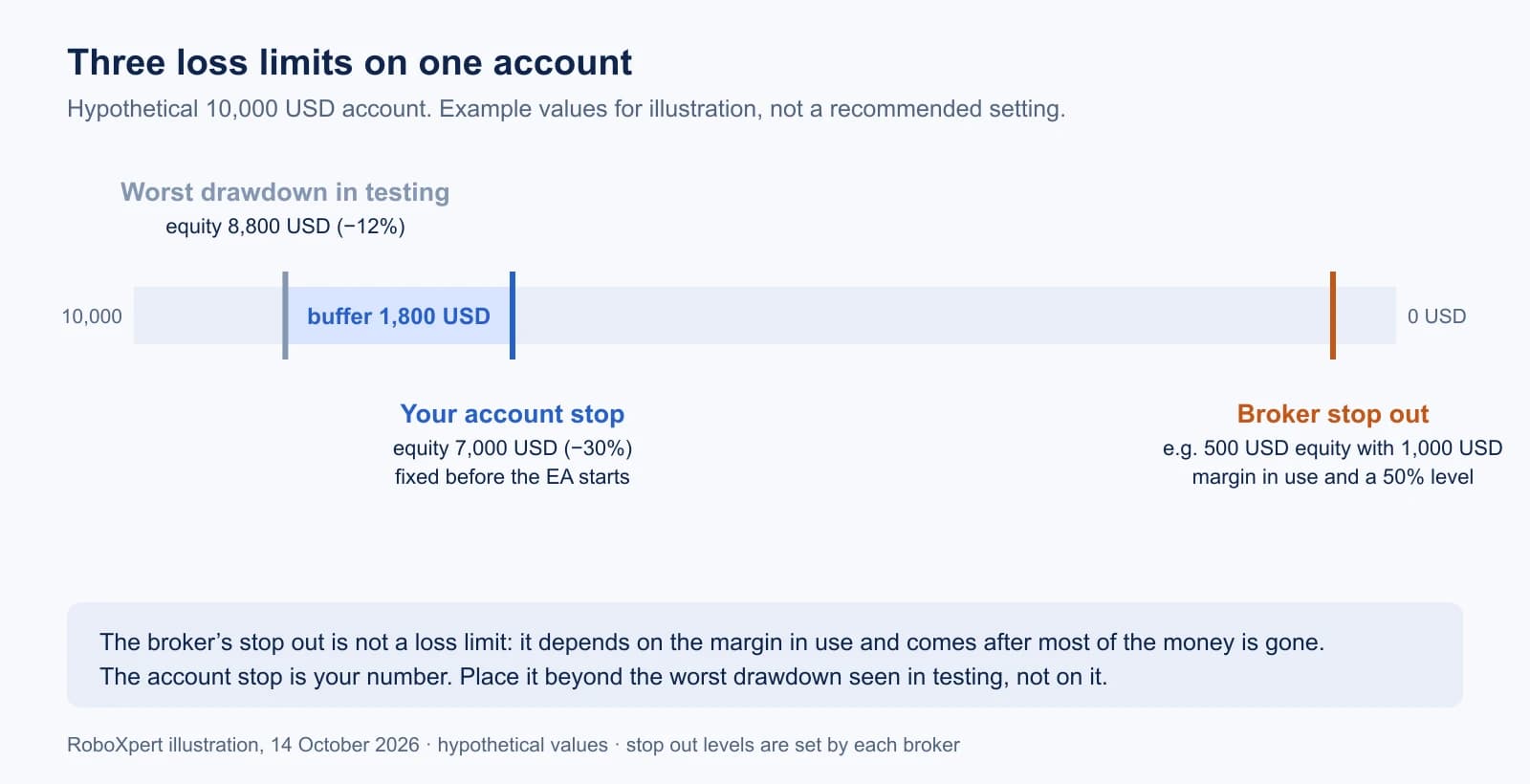
With 1,000 USD of margin in use and a stop out level of 50%, the broker closes the first position at 500 USD equity. On a 10,000 USD account, that is 95% below the start. The broker’s level tells you when the platform intervenes, not how much you are prepared to lose.
Leave a buffer above the worst drawdown
The worst drawdown in a backtest or live record is the worst that happened in one history. The next stretch of trading can go deeper with the same rules and the same edge. In our simulation, the same strategy at 1% risk per trade had a median worst drawdown of 26.2% over 48 months; in one path out of twenty it reached 43.9%. Only the order of wins and losses differed.
A stop placed exactly at the worst drawdown seen in testing will therefore be hit by ordinary bad luck. Place it beyond that drawdown, with room in between. In the illustration above, the tested worst drawdown is 12% and the stop is at 30%, a buffer of 1,800 USD. There is no universal factor; the buffer is a decision about how much bad luck the EA gets before you stop it.
The buffer also has to be in the account as money:
- The account has to carry the EA’s smallest possible position and every position it can hold at the same time. Our guide on EA lot size and capital shows how to work that out from the symbol specification.
- Money you plan to deposit later if things go badly is not a buffer. It moves the stop.
- If several EAs share the account, they share one buffer. See running multiple EAs on one MT5 account.
Do not turn the risk up
The risk setting decides how quickly a series of losses reaches the stop. With the stop 30% below a 10,000 USD start and each loss taking a fixed share of the current equity, these are the losing trades in a row that the account can absorb:
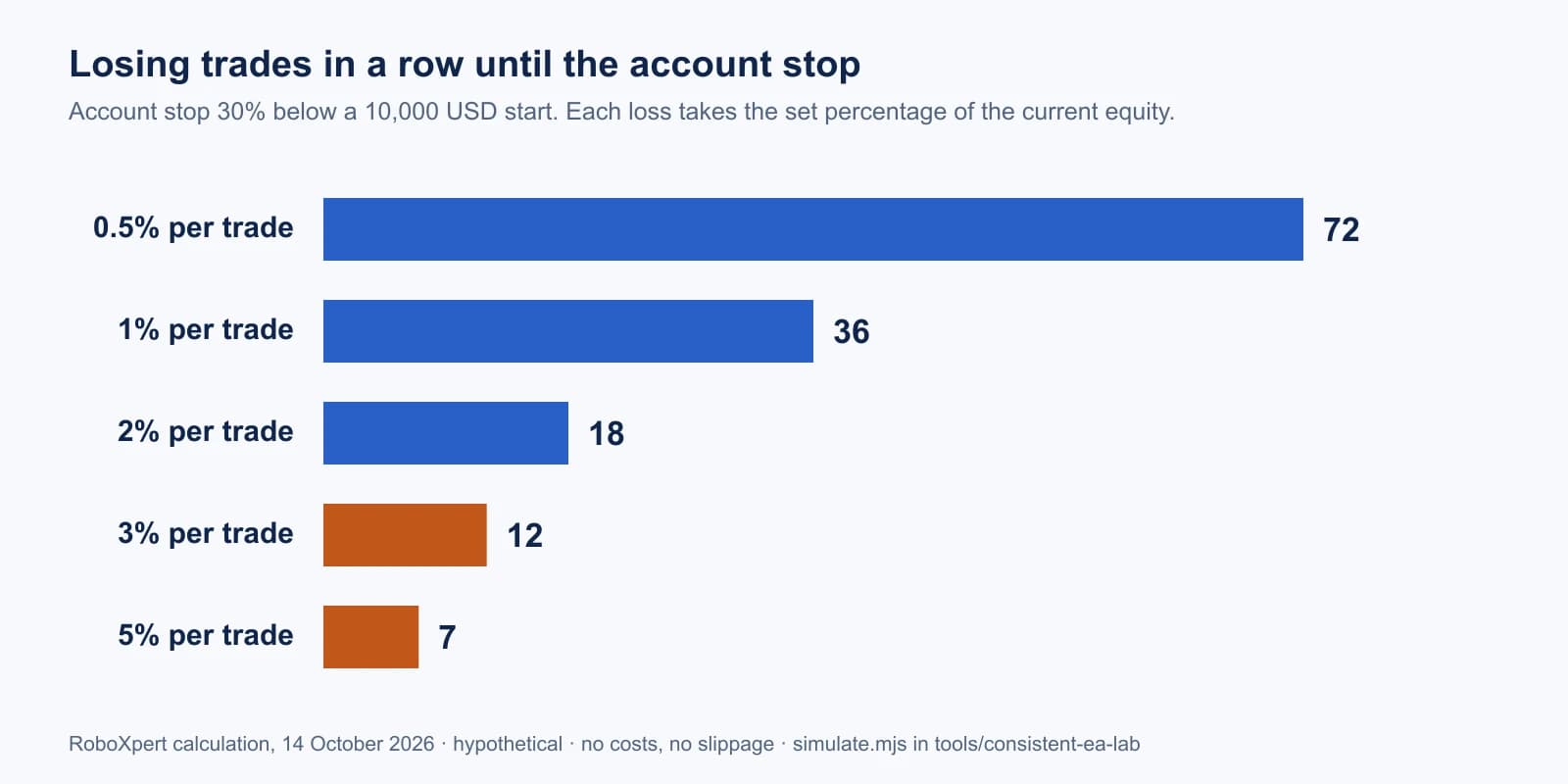
Losing streaks of 18 trades are rare for most strategies but do happen over years. To see what the risk setting does to one and the same strategy, we simulated 10,000 invented paths of 960 trades each (20 trades a month for 48 months). The strategy wins 42% of its trades and gains 1.5 times the amount risked when it wins: a small positive edge of 0.05 times the risk per trade. Every risk setting used the same 10,000 sequences of wins and losses.
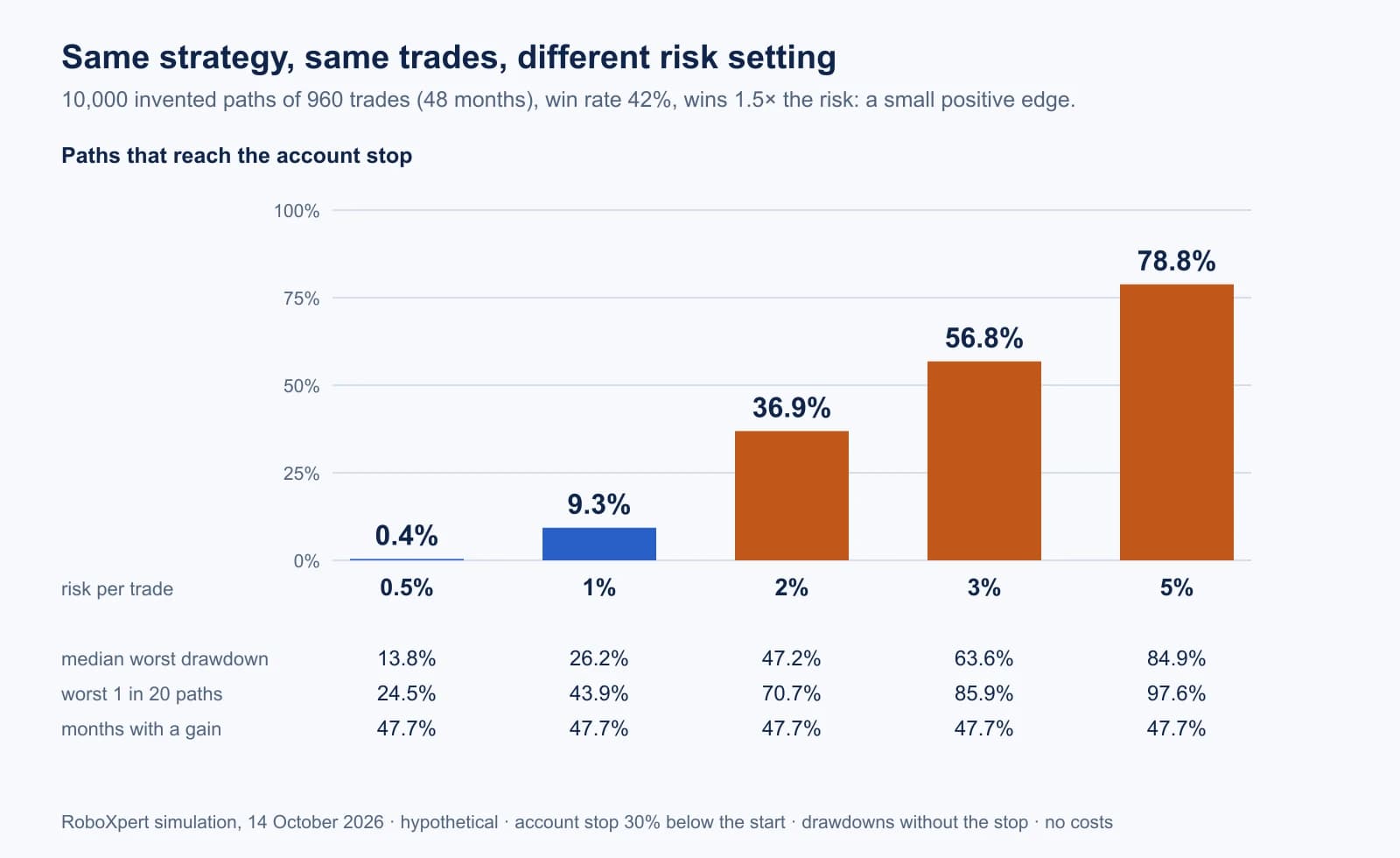
The table adds the other side: how many paths ended above the start without ever reaching the stop. It falls from 87.7% at 0.5% risk to 20.9% at 5%.
Scroll horizontally if needed
| Risk per trade | Paths that reach the account stop | Paths that end above the start without reaching it |
|---|---|---|
| 0.5% | 0.4% | 87.7% |
| 1% | 9.3% | 83.5% |
| 2% | 36.9% | 61.2% |
| 3% | 56.8% | 42.3% |
| 5% | 78.8% | 20.9% |
The strategy is the same in every row. The share of months with a gain stays at 47.7% whatever the risk: more risk does not make the results more consistent, it only makes each swing larger. At 5% risk, the stop ends almost four out of five paths, although every one of them has the same edge as the paths at 0.5%.
Risk goes up in more ways than the risk input:
- a larger fixed lot or risk percent after a good month,
- a lot multiplier after losses,
- a second or third EA on the same account,
- higher leverage that lets the EA open larger positions than before.
Work the setting backwards from the stop: decide how many losses in a row the account must survive, then choose the risk per trade that allows it.
When to switch an EA off
Decide the reasons before the EA starts, so that you do not have to judge them during a drawdown:
- The account stop is reached. Close, switch off, review. No restart on the same day.
- The drawdown is clearly deeper than anything in testing, even if the stop is not reached yet. The EA may be meeting a market its rules were not tested on.
- The EA behaves differently from the test: more positions at once, larger lots, trades at times or on symbols you did not expect.
- Something changed: a new EA version, other settings, another broker or account type. Test again before trusting the old figures. Our guide on backtest vs live trading explains what each kind of result can show.
How long an EA has to run before you can call it consistent has no fixed answer. A record that covers different market phases says more than one that covers many trades in a single quiet period.
Frequently asked questions
Is 30% the right account stop?
No percentage is right for everyone. The 30% in this guide is an example. The stop is the amount you are prepared to lose with this EA; start from that amount and set the risk so that the EA rarely reaches it.
Should the account stop be an amount or a percentage?
An amount is unambiguous: “stop at 7,000 USD equity”. A percentage needs a reference: the starting equity, the highest equity so far or the start of the day. If you use a percentage, write down which one.
Does a stop loss on each trade replace the account stop?
No. A stop loss limits one position. The account stop limits the sum of everything that is open, including several positions, several EAs and positions without a stop loss.
Can an account stop fail?
Yes. A utility or EA closes positions at the next available price, which can be worse than the stop after a gap or in fast markets. It also needs the terminal to run. The stop limits losses in normal conditions; it is not a guarantee of an exact amount.
What about an EA that advertises no losing months?
Treat it as a claim that needs evidence: the account, the period, open positions and drawdown on equity. Our guide on verifying EA results lists the checks.
Scope and commercial disclosure
Sources were checked on 14 October 2026. The simulation and the illustrations are hypothetical; no EA, broker or account was tested for this guide. The script and its results are in the repository folder tools/consistent-ea-lab. RoboXpert develops trading software, including an Expert Advisor and the risk utility Risk Guard. The limits described here apply to our own software as well; nothing in this guide is evidence that it is profitable.

Sources & further reading
- AMF: La lettre de l'Observatoire de l'épargne No. 10, October 2014 (retail forex and CFD results 2009–2012)
- CFTC Customer Advisory: AI Won't Turn Trading Bots into Money Machines
- ESMA: Notice of product intervention decisions on CFDs and binary options (ESMA35-43-1135)
- ESMA: ESMA ceases renewal of product intervention measures relating to contracts for differences (31 July 2019)
- MQL5 Reference: account properties and stop out modes
- MQL5 Programming for Traders: account margin settings
Your next question